
Canadian broker Questrade now offers MT4. I don't have any info or details on the "rule set" but there is a demo available. If you sign up, use this promo code pa1ink35, you get some free trades (50 bucks) but I'm not sure that applies to MT4, it might only be stocks.
They are regulated by IIROC and your account would be protected by CIPF, and that's killer protection!!
Monday, May 6, 2013
Questrade and MT4

Saturday, May 4, 2013
Money Management idea for MT4 EA’s
Lots of EA’s out there don’t place stops and the idea or risking a percentage of the balance isn’t really accurate. So you leave yourself open to more risk.
Here’s an idea that might help assuming your EA is profitable.
When an account grows and the lot size is determined by the risk value, the lots can get too big. Then the account gets hammered.
I know when I would kick this in for a demo but for a real account, would you really let it trade 1 lot? Maybe, but this way you can adjust it to your own appetite. This also lets you not worry to much about making withdrawals on time to gain back your initial investment or monthly withdrawals.
If you want to see the system performance and not colour the results with MM, use a constant lot size. The equity curve should be a relatively straight line. Then you use MM to curve it upwards. BUT, don;'t use MT4 to do this, it's not of ANY use.
To test this, start a demo and use a low lot size that would be lower than if your set the risk to 10. I would do this but I don't have any space for more demos. I might, however, try this add on to one of my existing experiments....
Then add your max lot size code and do another test.
Friday, May 3, 2013
The Spread in Forex (MT4)
I’m testing an EA called Crossfader (CF), this post discussed the spread as it impacts that EA.
Spreads are more on the exotics, less on the majors. This gets amplified in low liquidity So, my thoughts on exotics and the spread.....
Firstly, the CF biotch works great with EURUSD, the most proven and reliable pair. Hooking her up to an exotic? Why would you do this (other than a demo as an experiment), are you looking for a hidden treasure, are you subconsciously trying to ruin your account? That's purposely making your growth task much harder.
Slapping this EA on exotics and trying to then fix it with filters is a waste of time and increases your risk, not to mention work load and stress level (if live, not sure anyone is doing this yet...)
If you're trading live or planning to trade live at some time,
I recommend slapping it on the 6 majors, on a demo account. For analysing pairs.
Here's what I do, and consider I have a small nugget on a live test account with CF running;
Have 1 demo running 6 majors on all the time;
- Risk 10
- 100% DD
- check each week and month for each pairs performance. This will tell you what pairs to run live. [*]On MyFxBook you can analyse by pair.
Even put some additional pairs on it as you wish - The only purpose of this is to track pairs, not to see if the EA works or test DD or risk level, although you can glean some of this info from this demo
Spead Filters
- Let's say you are running biotch CF on EURUSD only.
Do you need a spread filter?
What number should it be set for?
Should it stop entries or entries AND exits?
Should it stop trading when spread is over or under your number (strange question right?)
When price is moving fast, like after a news event, is spread big or small? small, sometime there is no spread as there are so many trades going on.
When it's off hours and price is standing still, no bidders want to hit the ask, no sellers want to pay the bid, what happens? Large spread, price doesn't move, stalemate.
How about just before a news release? Wide spread, nobody wants to trade, they are waiting for the news. The market is open, lots of participants right? Nobody wants to trade.
wide spread = nobody wants to trade
What happens during market hours when price runs into daily support / resistance level? I bet most of you never watched a chart real time to see this.... As price approaches the level, you see many ticks, it slows as you arrive at the level, then you see nothing.... you check your internet connection, wtf? I lost my feed... then you see TICK.... the spread widens. This is where you want to enter or exit, a turning point possibly, or a breakout.
Don't believe me?
Run a spread recorder, install the market pace indicator so you can "hear" the market, and watch price on a 1 minute chart. Mark off area where price stalls.
Market pace is a nice piece - when price is moving slowly you hear a low volume tick pop sound. when price is at a level and stall, let's say price is rising, hits a level and stops. After about 30 seconds price will go down by the value of the wide spread, this larger movement makes a louder sound POP!!! It really is neat to watch this, it may help you understand the auction process.
Back to the questions above -
- Do you need a spread filter? entries, probably not if you turn the EA on for liquid session and use one of the majors.
What number should it be set for? use the spread recorder to find the right number.
Should it stop entries or entries AND exits? Probably both - apart from off market hours increasing spread, there are S/R areas and news events that increase spreads and I don't want to trade at that time, BUT - to get out of a trade at the profit level and worry about another pip, that doesn't concern me.
Should it stop trading when spread is over or under your number (strange question right?) This was the point of this post, now your thinking maybe I should enter when the spread is big during market hours? You must figure this one out on your own.
What am I doing? I'm adding a spread filter that just takes out the really stupid spreads, for example, EURUSD would not allow entry or exit on a spread of more than 4 pips. (that's actual pips, not fractional pips). Exotics, not trading them, those pairs are there for companies that do business in other countries, not for traders.)
Sunday, April 28, 2013
MT4 to Amibroker data feed and becktesting
We all know MT4 is a piece of shit for back testing (as well as some other things but lets stay focused!)
I want to test a system in Amibroker that has been written in MT4. First thing I’ll do it convert the code.
Then run it live in Amibroker with a data feed from MT4, to see if the same trades are opened and closed. This tell sme the code has been converted OK.
Next, I can back test it in Amibroker which has a robust back tester.
Here’s the plug-in to connect the two platforms.
http://www.marketcalls.in/amibroker/mt4-plugin-for-amibroker.html
Tuesday, February 12, 2013
Questrade offer MetaTrader (MT4)
Next step - What Canadian broker has MT4 and is covered under CIPF, and accepts USA or other countries?
I know that Questrade is going to be introducing MT4 in August some time.
UPDATE - They have MT4 now, here is the link
FXCM uses a company called Friedburg Direct, and the web site claims to offer MT4. I've sent an email to clarify, since I checked 3 months ago they did not have MT4 accounts in Canada (went to UK for MT4). I have a small FXCM account in UK. Here is the MT4 FXCM page.
I've looked at a bunch of brokers over the past week, I always look to see what country they are in. I found one in Mauritius (HotForex). I've been there. I wouldn't go with that broker with your money!! The broker would have to be in one of the large stable countries (with a half decent auditor!!!)
Alternatively, I'm looking at TradingStation II and Strategy Trader both offered by FXCM. I'm not using EA's except for TipsterTrendlines to place pending order. It's not an auto trading strategy, it's atool that does all the grunt work for my manual trades. So depending on what the next 2 months holds, I might go to that platform. After being hit by both MF Global AND PFG, I'm ONLY going with CIPF firms. There are to many f'n crooks in the finance world. The Canadian finance sector including banks are well regulated and offer a solid foundation, the credit crises really never screwed up our banks and real estate in Canada, not sure if anyone outside of Canada realises that.
So, I'm not saying that anyone should jump to Canadian firms, just that from my experience, any firm covered under IIROC and CIPF is well worth looking at in your comparison.
IIROC and CIPF
Here is some information that might help out the person wishing to open an investment account in Canada.
Protection and regulation are really two different things, depending on what you mean when you say “protection”. I define protection (for the purposes of this post) to be protection of my personnel funds in the case of another MF Global or PFG Best. Even if the regulator does not do their job (put your hand up American regulators!!!!) you will still get your funds returned to you.
Protection and regulation are really two different things, depending on what you mean when you say “protection”. I define protection (for the purposes of this post) to be protection of my personnel funds in the case of another MF Global or PFG Best. Even if the regulator does not do their job (put your hand up American regulators!!!!) you will still get your funds returned to you.
I was part of the MF Global non-sense, got every penny back, and it didn’t take very long either. I had an MF Global account that was registered in Canada.
Definitions
IIROC - Investment Industry Regulatory Organization of Canada.
CIPF - Canadian Investor Protection Fund.
IIROC is the Canadian Regulator. CIPF Members are Dealer Members of IIROC.

Mission Statement: To contribute to the security and confidence of customers of Canadian investment dealers by maintaining adequate resources to return assets to eligible customers in cases where a Member becomes insolvent.
In the unlikely event that the Member you are dealing with becomes insolvent, CIPF will ensure the securities, cash and other property that are held in your account are returned to you in accordance with our Coverage Policy.
Investment dealer insolvency doesn’t happen very often. In fact, since CIPF’s inception in 1969 there have been only 18 Member insolvencies. CIPF has made payments of $36 million, net of recoveries, and no eligible customers have suffered a loss of property.
So, for anyone outside of Canada (except AUSA residents), take a look at this page.... it tells you what and who is covered under CIPF.
http://www.cipf.ca/Public/CIPFCoverage/ ... olicy.aspx
Does it matter if I do not live in Canada, or if I am not a Canadian citizen or a Canadian resident?
No. CIPF coverage does not depend upon residency or citizenship. CIPF coverage is available to you when you open an account with a CIPF Member.
If you are living in the USA, forget it. The U.S regulators are soooo terrible that they demand your money stays inside the U.S. Imagine if this rule didn't exist, there would be a whole lot of American funds being transfer outside the country. Other countries respect the regulator so they don't open accounts for Americans. I have money sitting in the bankruptcy case with PFG – so I don’t have anything good to say about the US financial system.
Sunday, February 10, 2013
Free Online Charting
Here is a list of online charting applications. They all run on your browser, chartingstation can also run on your desktop. I use the first one listed since it was the first one online and I’m used to it now. If I was to start fresh, I think I would go with chartingstation as they have less advertising on the screen real estate.
Take a few minutes and explore each of them. They are all free, free data from the BATSA exchange, meaning I wouldn’t trade intraday off those quotes but it gives you a great idea of where the market is. I mostly use it for my long term holding check, and to look at the US dollar index on the weekends.
In the end, pick one and stay with it.
http://www.freestockcharts.com/
by Worden brother. Although I like this, its heavy advertising and a push to upgrade or go with there platform TC 2000. I stay with the free version as it does what I need.
Community based, tons of features.
http://www.chartingstation.com
- Multi-screen end-of-day stock charting software
7 chart types (Candle, Point & Figure, Renko, Kagi, Heikin-Ashi, Line, High-Low)
16 drawing tools (Fibonacci tools, Gann tools, Channels, Andrew's Pitchfork, Text, Basic Shapes)
70+ indicators and chart transformations
Access 3 free stock data providers (Yahoo!, Google, MSN Money)
Load custom Comma Separated Value (CSV) files
Multi-platform: Windows, Mac OS X, Linux
Use from your desktop or web browser
Thursday, December 20, 2012
The end of the world
Do you think the world will end on December 21, 2012?
With the impending date of Dec. 21, we wonder if this will really be the year that the world comes to an end, but looking back, we see that the end of the world was supposed to come about 17 times already.
Is the world really going to end, though? According to the Mayans, some say, yes. Others feel it may just be a myth, or that the Mayans simply ran out of rock.
Why the 21st of December of this particular year? What calculations did the Mayans, who were incredibly advanced in math and science, have to come up this exact date? How valid are their calculations? Many doubt that the Mayans could have predicted the end, as it was several thousands of years away.
Some wonder if the few days before the 21st will become a sort of Black Friday shopping spree.
I don't think it will end on the 21st. Maybe a few weeks after that :)
Friday, November 30, 2012
ProSLTP
There is a tool out there called ProSLTP. It costs money, really? The functionality is OK but this guy is charging for it.
ProSLTP Review
If your here you were probably searching for reviews of this tool, or the tool itself.
If you want a real free tool, go here and get TT2P.
The latest version is always on the first post.
ProSLTP Review
If your here you were probably searching for reviews of this tool, or the tool itself.
If you want a real free tool, go here and get TT2P.
The latest version is always on the first post.
Monday, November 12, 2012
MT4 Signal Service
This last weekend I updated my platform to build 445. I'm running a FXCM platform on my smaller account. The update included a signal service from the MT5 / MT5 community. Here's the look of the new options tabs. Any comments on the new service? Here is the link to MT4 Signals.


Sunday, November 11, 2012
The sound of the market
Ever wondered what the market would "sound" like?
Even if you don't find this Indicator useful for your day-to-day trading, it's interesting to listen to it for a while.
On Forex Factory, under the thread called "Scalping With Sound", I found this gem. (You'll have to sign up to get these files).
I installed this on the MT4 platform, on a Windows 7 machine. A little crazy to get it to work but I finally manage it. The trick was to select the new sound files, right click properties, and "Unblock" the files.
This is an indicator, so you put the "rooicol - Market Pace.ex4" file in the MT4/experts/indicators directory. Put the sound files in MT4/sounds. Then you re-start MT4.
Here is what I mean by "unblock". You need to do it for each file. It might work doing it once for the zip file after download.

Listen to the ticks as price reaches support, resistance, supply, demand, or whatever you call it in your world. The ticks will stop, silence..... If price breaks this area (rising for example) and shoots up, the ticks go crazy. If price backs off, you hear price getting smacked down, then slowly rising again.
Listen when the market is busy, I bet it sounds busy on a news release!
Even if you don't find this Indicator useful for your day-to-day trading, it's interesting to listen to it for a while.
On Forex Factory, under the thread called "Scalping With Sound", I found this gem. (You'll have to sign up to get these files).
I installed this on the MT4 platform, on a Windows 7 machine. A little crazy to get it to work but I finally manage it. The trick was to select the new sound files, right click properties, and "Unblock" the files.
This is an indicator, so you put the "rooicol - Market Pace.ex4" file in the MT4/experts/indicators directory. Put the sound files in MT4/sounds. Then you re-start MT4.
Here is what I mean by "unblock". You need to do it for each file. It might work doing it once for the zip file after download.

Listen when the market is busy, I bet it sounds busy on a news release!
Friday, September 14, 2012
MultiCharts Discretionary Trader
MultiCharts was previously available for free, the catch is that trades could only be placed manually, no automation. It did however allow for chart trading, and it did a pretty good job at it.
You could place orders by clicking on the chart, with multiple targets. You could attach strategies such as breakouts or limit orders and as bracket orders as well. I didn't like the fat that it waited until the order was filled before it placed stops and targets (bracket).
The software has the ability to connect to a bunch of brokers as well, for order placement.
If your looking for this trading platform, you can probably find the torrent for it. I am fairly certain it still works as a free version to connect to a pile of brokers, but I'm not sure how buggy it is.
I wrote a post a while back on this platform, that it was GONZO. They took the free version off the web site. The paid platform looks very kick-ass if your a full time trader.
If you want to read more about it here is the MultiCharts web page, click on the "Compare editions" on the left side. Also, mouse over the "MultiCharts" on the top to see a huge menu to learn more about this package. I don't use it but if I was a full time trader I would seriously consider it.
Thursday, August 30, 2012
How to program AFL in Amibroker and MQL for MT4
I’m a self taught programmer, the only classes I ever took part in were in high school. Back in the day of the cards – you had to use a pencil on some cards then feed them into a machine and it ran your program. I learned Fortran first. Then a tried basic language on a Commodore 64 or something, long time ago, can’t remember the details.
If you want to learn Amibrokers AFL or MT4 here are a few suggestions:
Take a night course in programming, not sure which language is close to either of these but if you ask in some forums or Google for similarities you’ll find answer. If you already know a language, don’t bother with school, jump to step 2.
You first need to learn logic flow and what functions are and what object programming means, your looking learn to the concept of programming and how you write a program, run it, and debug it. Then you can cross utilise this skill with any other language. It takes some self learning.
The next step, load up a small program and try to understand it. If you put your cursor on a function (which usually highlighted in blue) and press F1 help opens up and you can read about the function. Then read the help docs on program flow to understand how the program executes.
Next – load up a bigger program and understand the flow. Make some small changes, maybe try to print stuff to the screen or alerts menu, or send en email.
Next – read a tutorial, free one are always offered on line. You can start with this as step one as well but after you play with code you should go back to a tutorial and read it again. Read the tutorial once a week for 3 weeks, read it to understand it. Read it when the kids are in bed, you need to focus un-interrupted.
Next – have an idea of what you want to do, then steel some code as a starting point and modify it to suit your coding goal. here’s an example. Load up the stochastic indi. Make an indicator in one single window with 3 stochastic, with either K or D. Set them to 8, 21, and 55 periods. Run it on a 15 minute timeframe. Now add another that is set to a forced time frame of 4 hours and is an average of the 8, 21, and 55 periods. Plot the four lines. Use the same colour for the 15 minute and a thicker and different color for the 4 hour.
Then, ask yourself this – am I coding because I like it and trading is secondary, or am I coding for a purpose? I got into the rut of coding because it was a challenge. I wasn’t learning to trade. Then I decided to just watch the screen and price action and learn to trade. Then code for what I wanted to do.
And the best for last – I don’t think I have ever written a program from scratch – I always start with something that has been done already, then change it, add to it, delete stuff, and make adjustments. After a while there might not be anything left of the original, but it sure make it easier to start.
If you want to learn Amibrokers AFL or MT4 here are a few suggestions:
Take a night course in programming, not sure which language is close to either of these but if you ask in some forums or Google for similarities you’ll find answer. If you already know a language, don’t bother with school, jump to step 2.
You first need to learn logic flow and what functions are and what object programming means, your looking learn to the concept of programming and how you write a program, run it, and debug it. Then you can cross utilise this skill with any other language. It takes some self learning.
The next step, load up a small program and try to understand it. If you put your cursor on a function (which usually highlighted in blue) and press F1 help opens up and you can read about the function. Then read the help docs on program flow to understand how the program executes.
Next – load up a bigger program and understand the flow. Make some small changes, maybe try to print stuff to the screen or alerts menu, or send en email.
Next – read a tutorial, free one are always offered on line. You can start with this as step one as well but after you play with code you should go back to a tutorial and read it again. Read the tutorial once a week for 3 weeks, read it to understand it. Read it when the kids are in bed, you need to focus un-interrupted.
Next – have an idea of what you want to do, then steel some code as a starting point and modify it to suit your coding goal. here’s an example. Load up the stochastic indi. Make an indicator in one single window with 3 stochastic, with either K or D. Set them to 8, 21, and 55 periods. Run it on a 15 minute timeframe. Now add another that is set to a forced time frame of 4 hours and is an average of the 8, 21, and 55 periods. Plot the four lines. Use the same colour for the 15 minute and a thicker and different color for the 4 hour.
Then, ask yourself this – am I coding because I like it and trading is secondary, or am I coding for a purpose? I got into the rut of coding because it was a challenge. I wasn’t learning to trade. Then I decided to just watch the screen and price action and learn to trade. Then code for what I wanted to do.
And the best for last – I don’t think I have ever written a program from scratch – I always start with something that has been done already, then change it, add to it, delete stuff, and make adjustments. After a while there might not be anything left of the original, but it sure make it easier to start.
Tuesday, August 28, 2012
Canadian Forex Accounts
If you have the option to open an account in Canada for Forex, you will gain a great protection plan!
IIROC is the regulator in Canada, here's the blurb from there site.
If you have an account with a CIPF Member you have CIPF protection - coverage is automatic for all eligible customers. For more information, go directly to our Coverage Policy.CIPF is sponsored by the Investment Industry Regulatory Organization of Canada (IIROC) and is the only compensation fund approved by the Canadian Securities Administrators for IIROC Dealer Members. All IIROC Dealer Members are CIPF Members.
So, for anyone outside of Canada, take a look at this page.... it tells you what and who is covered under CIPF. http://www.cipf.ca/Public/CIPFCoverage/ ... olicy.aspx
The sad part for US residents is that the Canadian regulator respects the US regulaor. US regulator does not allow US residents from opening accounts outside the US.
Question: Does it matter if I do not live in Canada, or if I am not a Canadian citizen or a Canadian resident?
Answer: No. CIPF coverage does not depend upon residency or citizenship. CIPF coverage is available to you when you open an account with a CIPF Member.
Canadian Brokers offering MT4
FXCM uses a company called Friedburg Direct. I have an account with them. Here is the MT4 FXCM page.
Over 5K you also get a free VPS. 1:50 leverage - and that's OK with me!!
I know that Questrade is going to be introducing MT4 some time in the near future.
Forex.com (Gain Capitol) - good spreads. free VPS with 5K or more.
Monday, August 27, 2012
Tipster Trendlines - Amibroker
Update - I've closed my Interactive Brokers account where I use Amibroker and Tipster Trendlines (for Amibroker). I'm using MT4 now and TT2P found at Stevehopwoodforex.com forum. You can find the link at the top of this blog. I will be dropping the price of the Amibroker code shortly and the support will be limited. The code still works for the current version of IB TWS and Amibroker.
Sunday, August 26, 2012
My Brokers
I was MF Global and they blew up - I got all my money back thanks to the Canadian regulation system. I'll write about that shortly.
I was then with PFGBest and they blew up - the account was in the US and my money is stuck in the bankruptcy fiasco.
I'm now with Forex.Com (Gain Capitol) and FXCM Canada.
Both accounts are held in Canada and have no hedging restrictions or FIFO rules. Leverage is 100:1.
I use MT4 on both. Both allow comments and magic numbers for full MT4 functionality. Spreads are better on the majors at Forex.com.
So far, so good. I just started trading the accounts and I'll post links to performance on the page listed at the top of this blog.
I was then with PFGBest and they blew up - the account was in the US and my money is stuck in the bankruptcy fiasco.
I'm now with Forex.Com (Gain Capitol) and FXCM Canada.
Both accounts are held in Canada and have no hedging restrictions or FIFO rules. Leverage is 100:1.
I use MT4 on both. Both allow comments and magic numbers for full MT4 functionality. Spreads are better on the majors at Forex.com.
So far, so good. I just started trading the accounts and I'll post links to performance on the page listed at the top of this blog.
Monday, July 16, 2012
PFG Best News
By now you have probably heard what happened with PFG Best.
If you have been caught up in this event and wish to speak to someone at PFG, here is a link to the complete company phone directory. Screen capture it before it goes away. And while your at it, leave a voice mail for the top dog, his number is on the list.
PFGBest Phone Directory
If you have been caught up in this event and wish to speak to someone at PFG, here is a link to the complete company phone directory. Screen capture it before it goes away. And while your at it, leave a voice mail for the top dog, his number is on the list.
PFGBest Phone Directory
Monday, May 14, 2012
What does a top look like? Why does price turn?
In this post, I'll discuss the USDCAD tops formed in 2008 and 2009. Before I set out to trade any pair or instrument using this method as defined by Sam, I examine the chart, all the evidence is there for you in history. Some forex pairs I just don't trade because I can't see many areas where price respected supply and demand as Sam explains it.
Before I get into this, I want to say that I wasn't much of a trader in 2008, my methods were different, and I never traded any of these tops. It is also easy to go back and say would have, could have, but you can learn from the set-ups from the past. They are not hard to spot if you go back and look at charts, scroll forward and see if it would have worked out for you. Write down winners and loser and approximate pips. Do some quick rough back testing to see if it works for you, or how good you are at picking levels.
Let’s take a look at the USDCAD chart. Here is a global view of the tops I'm looking at, label Top 1 to Top 4. The difference between all the highs is only 80 pips, as shown on the daily chart. Using the daily or weekly we can see some obvious tops. These are not low volatility moves, mistakes, intraday hiccups, or noise. The chart below is daily bars so there are lots of trades in each bar. The difference between the 4 highs shown in yellow is only 80 pips. Look at the rejection of top 3, price just went screaming away from 1.3000, that tells me lots of traders were prepared to take that trade. Top 3 sped away the fastest but to be honest, the first three tops all screamed away from 1.3000 quickly. When I say quickly, don’t get excited like we are racing cars here. Look at the zoom shots of the chart, count the bars. It takes time for price to move – this is the patience factor. Once you place the trade, walk away because it’s like watching paint dry. The only time I watch the chart is when I day trade ES or currency futures on my Interactive Brokers account.
The first 3 tops actually looks like an ascending triangle, and this is “supposed” to break to the upside! Well it didn’t. So much for the breakout trade. A failed breakout is sometimes a bull trap! Look at top 4 for that! The highest of all and falls away very quickly.
Top 1, 2, 3 and 4 (below)
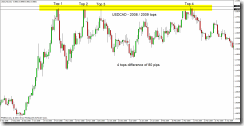
The black lines are the highs, the top most and bottom most high. The blue line is 1.3000.
Top 1 - Initial move almost exactly to the huge round number of 1.3000. Wait for the reaction at 1.3000. Price almost always will re-visit the area where it turned and shot away. When it did re-visit the area, 16 hours later, look where it stopped and turned. Right where Sam tells you the "zone" is located. Price didn't penetrate that zone very far. The zone in Top 1 is shown with the red rectangle. Remember, next time price gets back here, it will most likely go a bit deeper into the "zone". If you didn't catch this trade, remember to watch price later if and when it does get here. The only reason to take this trade would have been for a bounce off 1.3000, or the re-test of this area 16 hours later. Price was in an up trend so the 16 hour re-test would have been a low risk trade, probably seen by those watching the 1 or 4 hour time frame.
Top 1 (below)
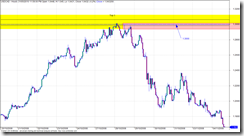
Top 1 and 2 - Zooming in on top 1 and top 2 on an hourly chart to see what the tops look like up close. Both times price spent between 1 and 4 hours in the area, so it took some time for the orders to work and process until the price eventually dropped. Top 1 you can see a quick drop, quick as in it took hours of red candles before retracing. The retrace went right into the sweat spot to short (Sam Seiden Supply and Demand). This could have been a low risk entry, but you wouldn’t have known that this would be the turning point. The only thing s you had to go on were the huge round number of 1.3000 and the supply area (red box). But it offered a low risk entry with a stop just above the previous top hours earlier.
Top 1 and 2 (below)
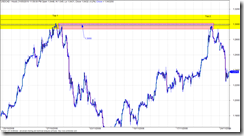
Top 2 - (below) came right up into the sweet spot for the short. You should have seen this coming weeks in advance, and placed a limit (pending) order. It’s entries like this that I would lean hard on the risk, I typically do a 2% risk but when the planets all line up I’ll crank it up to 5% or 10%. Read about the Kelly calculation to get an idea of the max risk you should trade, I will max out at 10% or 20% Kelly.
Top 2 (below)
Top 2 and 3 – Top 2 has already depleted some of the order from Top 1, so as price approaches you should be thinking that price might go deeper into the zone to take out some of the orders.Top 3 did go deeper into the zone, and there must have been traders waiting because it was sent screaming away.
Top 2 and 3 (below)
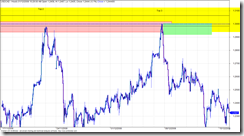
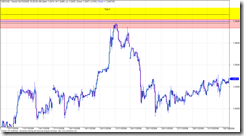
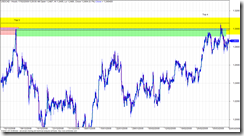
Top 3 and 4 – Why did Top 4 penetrate Top 3 if Top 3 was so powerful at sending price back down? Well Top 4 penetrated the level even more, it actually made a new high. Ever notice how price breaks out like that? I bet you do, everyone gets burned like that looking for the breakout. Well, the way the experts explain it is like this…. Top 4 penetrates even deeper, hen makes a new high. Break out traders are waiting and jump in but there are not enough of them to push price past all the experts waiting for the breakout traders. They jump in with lots of cash and drive price down. There are no willing buyers to keep it going, it’s “overbought” or just plain to much for the big money to pay, they don’t pay retail. This sounds like a good explanation but it really doesn’t matter, all you need to remember is the third or fourth test could go either way so keep you stop close by so you don’t get hammered. Nobody knows which way it will go.
Top 3 and 4 (below)
What did we learn?
When you watch football, where is the “line” on the filed that makes you almost sure something is about to happen on the score board? The goal line. So if you could get the same odds for a bet on the next play to be a touchdown, would you bet when the ball was on the 30 yard line or the 1 yard line? Wait for price to get to the goal line. And understand what makes price move – it’s not a bunch of candles that all line up, look for where the order sit, price move from these areas in a big way. Memorise the odds enhancers. Search with Google until you find the odds enhancer file, one document that is pretty good is called “BS Trading”.
The lesson here, or what you need to take away is that you can figure about how to trade simply by using the data you already have. Look for obvious turning points, circle them and make notes. Study the chart. Remember that longer term charts are more reliable. Inside of 1 hour is choppy and sometimes unpredictable so don’t use it to study. If you want to scalp under 1 hour go for it, but make sure there is movement and your doing it when at least two markets (up to 11am EST) are open. I look at the daily then zoom into the 4 hour for a better look, sometimes I use the 1 hour for a closer look but I don’t use the 1 hour to study.
Use your software playback feature or the function key that lets you advance a bar at a time. You might also notice differences between pairs. The EURUSD seems to work well with supply and demand, but some others like CHF are all over the place and I have yet to find and rhythm, rhyme, or reason for how it behaves so I generally stay away from it.
Try out the trading games on the net, I posted about that earlier.
If you want to know more about Sam Seiden, look at Trading Academy or Fxstreet.com for recorded webinars.
Before I get into this, I want to say that I wasn't much of a trader in 2008, my methods were different, and I never traded any of these tops. It is also easy to go back and say would have, could have, but you can learn from the set-ups from the past. They are not hard to spot if you go back and look at charts, scroll forward and see if it would have worked out for you. Write down winners and loser and approximate pips. Do some quick rough back testing to see if it works for you, or how good you are at picking levels.
Let’s take a look at the USDCAD chart. Here is a global view of the tops I'm looking at, label Top 1 to Top 4. The difference between all the highs is only 80 pips, as shown on the daily chart. Using the daily or weekly we can see some obvious tops. These are not low volatility moves, mistakes, intraday hiccups, or noise. The chart below is daily bars so there are lots of trades in each bar. The difference between the 4 highs shown in yellow is only 80 pips. Look at the rejection of top 3, price just went screaming away from 1.3000, that tells me lots of traders were prepared to take that trade. Top 3 sped away the fastest but to be honest, the first three tops all screamed away from 1.3000 quickly. When I say quickly, don’t get excited like we are racing cars here. Look at the zoom shots of the chart, count the bars. It takes time for price to move – this is the patience factor. Once you place the trade, walk away because it’s like watching paint dry. The only time I watch the chart is when I day trade ES or currency futures on my Interactive Brokers account.
The first 3 tops actually looks like an ascending triangle, and this is “supposed” to break to the upside! Well it didn’t. So much for the breakout trade. A failed breakout is sometimes a bull trap! Look at top 4 for that! The highest of all and falls away very quickly.
Top 1, 2, 3 and 4 (below)

The black lines are the highs, the top most and bottom most high. The blue line is 1.3000.
Top 1 - Initial move almost exactly to the huge round number of 1.3000. Wait for the reaction at 1.3000. Price almost always will re-visit the area where it turned and shot away. When it did re-visit the area, 16 hours later, look where it stopped and turned. Right where Sam tells you the "zone" is located. Price didn't penetrate that zone very far. The zone in Top 1 is shown with the red rectangle. Remember, next time price gets back here, it will most likely go a bit deeper into the "zone". If you didn't catch this trade, remember to watch price later if and when it does get here. The only reason to take this trade would have been for a bounce off 1.3000, or the re-test of this area 16 hours later. Price was in an up trend so the 16 hour re-test would have been a low risk trade, probably seen by those watching the 1 or 4 hour time frame.
Top 1 (below)

Top 1 and 2 - Zooming in on top 1 and top 2 on an hourly chart to see what the tops look like up close. Both times price spent between 1 and 4 hours in the area, so it took some time for the orders to work and process until the price eventually dropped. Top 1 you can see a quick drop, quick as in it took hours of red candles before retracing. The retrace went right into the sweat spot to short (Sam Seiden Supply and Demand). This could have been a low risk entry, but you wouldn’t have known that this would be the turning point. The only thing s you had to go on were the huge round number of 1.3000 and the supply area (red box). But it offered a low risk entry with a stop just above the previous top hours earlier.
Top 1 and 2 (below)

Top 2 - (below) came right up into the sweet spot for the short. You should have seen this coming weeks in advance, and placed a limit (pending) order. It’s entries like this that I would lean hard on the risk, I typically do a 2% risk but when the planets all line up I’ll crank it up to 5% or 10%. Read about the Kelly calculation to get an idea of the max risk you should trade, I will max out at 10% or 20% Kelly.
Top 2 (below)

Top 2 and 3 – Top 2 has already depleted some of the order from Top 1, so as price approaches you should be thinking that price might go deeper into the zone to take out some of the orders.Top 3 did go deeper into the zone, and there must have been traders waiting because it was sent screaming away.
Top 2 and 3 (below)

Top 3 and 4 – Why did Top 4 penetrate Top 3 if Top 3 was so powerful at sending price back down? Well Top 4 penetrated the level even more, it actually made a new high. Ever notice how price breaks out like that? I bet you do, everyone gets burned like that looking for the breakout. Well, the way the experts explain it is like this…. Top 4 penetrates even deeper, hen makes a new high. Break out traders are waiting and jump in but there are not enough of them to push price past all the experts waiting for the breakout traders. They jump in with lots of cash and drive price down. There are no willing buyers to keep it going, it’s “overbought” or just plain to much for the big money to pay, they don’t pay retail. This sounds like a good explanation but it really doesn’t matter, all you need to remember is the third or fourth test could go either way so keep you stop close by so you don’t get hammered. Nobody knows which way it will go.
Top 3 and 4 (below)

What did we learn?
When you watch football, where is the “line” on the filed that makes you almost sure something is about to happen on the score board? The goal line. So if you could get the same odds for a bet on the next play to be a touchdown, would you bet when the ball was on the 30 yard line or the 1 yard line? Wait for price to get to the goal line. And understand what makes price move – it’s not a bunch of candles that all line up, look for where the order sit, price move from these areas in a big way. Memorise the odds enhancers. Search with Google until you find the odds enhancer file, one document that is pretty good is called “BS Trading”.
The lesson here, or what you need to take away is that you can figure about how to trade simply by using the data you already have. Look for obvious turning points, circle them and make notes. Study the chart. Remember that longer term charts are more reliable. Inside of 1 hour is choppy and sometimes unpredictable so don’t use it to study. If you want to scalp under 1 hour go for it, but make sure there is movement and your doing it when at least two markets (up to 11am EST) are open. I look at the daily then zoom into the 4 hour for a better look, sometimes I use the 1 hour for a closer look but I don’t use the 1 hour to study.
Use your software playback feature or the function key that lets you advance a bar at a time. You might also notice differences between pairs. The EURUSD seems to work well with supply and demand, but some others like CHF are all over the place and I have yet to find and rhythm, rhyme, or reason for how it behaves so I generally stay away from it.
Try out the trading games on the net, I posted about that earlier.
If you want to know more about Sam Seiden, look at Trading Academy or Fxstreet.com for recorded webinars.
Friday, April 13, 2012
Risk Management
This is a great example of how math impacts your results. I use 2%.
This is worth watching - but you must also understand it and remember it !!
This is worth watching - but you must also understand it and remember it !!
Saturday, April 7, 2012
Tipster Trendlines for Amibroker Group (Forum) on Google
I opened up a discussion group, if you have purchased Tipster Trenlines you should have received an email invite for this closed invitation only group.
If you didn't get the invite, send me an email.
If you didn't get the invite, send me an email.
Tipster Trendlines |
Visit this group or here |
Tuesday, March 27, 2012
MultiCharts Discretionary Trader – Gonzo
I downloaded MultiCharts Discretionary Trader a while back and installed it. It took me a little while to get around to testing it. It’s a free version of the platform.
It’s prefect for the way I trade, from the charts. It connects to many many brokers, including IB’s TWS. It can place brackets and fades, trailing stops, etc. with ease. It shows all of this on the chart, very very nice. What’s the catch?
Well, it was introduced on Feb 1, 2011 and discontinued on March 19, 2012. Here is the post from them that announces the end of the free-bee.
Quite a marketing scam isn’t it.
Here is a blog post or two that tells you all about the chart trading feature.
Post 1
Post 2
I still have the installation file on my PC, and I’m still testing it with TWS. Try looking for a torrent if you need the file. Go to your favourite site, like pirate bay and put this in the search field *multicharts*
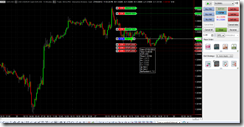
It’s prefect for the way I trade, from the charts. It connects to many many brokers, including IB’s TWS. It can place brackets and fades, trailing stops, etc. with ease. It shows all of this on the chart, very very nice. What’s the catch?
Well, it was introduced on Feb 1, 2011 and discontinued on March 19, 2012. Here is the post from them that announces the end of the free-bee.
Quite a marketing scam isn’t it.
Here is a blog post or two that tells you all about the chart trading feature.
Post 1
Post 2
I still have the installation file on my PC, and I’m still testing it with TWS. Try looking for a torrent if you need the file. Go to your favourite site, like pirate bay and put this in the search field *multicharts*

Sunday, March 4, 2012
Running Multiple Copies of MT4
How do you synch the files (experts, scripts, etc.) between multiple copies of MT4?
Where do you run your line MT4? …and your demo? How fast does the machine need to be?
Here is my routine and set-up, to give you something to think about.
I have two computers.
1. One I use on a day to day bases to check email, surf, do MT4 coding and back testing, general stuff. It’s blazing f’n fast with RAID hard drives. Windows 7, AMD IIX4 3.2Ghz, 8Gb ram, 64 bit OS. I don’t need this speed for this PC but I needed a new PC, the price was right.
2. Second PC is an old P4 running XP, 3.0Ghz and 4GB ram. I hate using it as a day to day, it’s to slow and can’t keep up with me. But as a trading machine sitting in the corner it’s quite happy. I also run Winamp on it 24/7 with an FM transmitter PCI card in it so I have tunes all over my house.
3. NAS – Network Area Storage – 1TB of redundant drives. This is where the MP3’s are that played on the second computer. This is where I store my MT4 files for back-up and synching.
Here’s the drill:
Saturday – On computer 2 – run cCleaner to get rid of old files, and a registry check, defrag the hard drive, run a virus scan full power down, power up. Virus scanner doesn’t check my trading directories, I excluded them. All files to this machine come from computer 1 anyways, and they get checked there. I use the free Microsoft virus scanner.
Sunday – set-up trades on my live accounts running on computer 2. Also set up some trades on demo account running on computer 1. I also run a demo on computer 2 that copies trades from other traders, checking to see if this is worthwhile.
During the Week – might do some coding on computer 1. Once I’m done, I run Microsoft SyncToy. It copies all the files in my demo MT4 coding platform to the NAS for storage. Then it copies those files to computer 2 to all the MT4 platforms running there. I have to run SynchToy twice for the changes to make.
To format my code before I am finished with it, I do this:
Downloaded AStyle.exe, a free open source formatter. Put it in experts and scripts directory. Then I made a batch file and put it in there as well. To format my code, double click the format.bet file and away you go, takes less than a second. Here is the batch file called “format.bat”
ECHO OFF
ECHO ...............................................
ECHO THIS WILL FORMAT ALL MQ4 FILES IN THIS DIRECTORY
ECHO ...............................................
pause
AStyle.exe -A2 -s3 --mode=c *.mq4
ECHO ...............................................
ECHO CHECK RESULTS AND PRESS ANY KEY TO EXIT
ECHO ...............................................
pause
Here is the interesting part, how much processor does the MT4 take up? It depends on how many ticks are coming in, that triggers your EA’s to execute. Here’s a short video on using a tick simulator while running several MT4’s with EA’s and how the number of ticks per second causes the processor load to increase.
Friday, March 2, 2012
magic stick versus trading sticks
Either way you compare these two they are both not for me.
You can read about them here….
http://www.forexpeacearmy.com/public/review/www.4xcircle.com – for comments and user reviews, assuming what you read is by real people not affiliated with them.
and here is the price at http://www.forexmoneytrendline.com/
$500. Put away your reading glasses, it says five hundred bucks!!!!
Learn to trade with price action and supply and demand, then get the FREE TipsterTrendlines for MT4.
Thursday, March 1, 2012
Trading Mentor…. or not?
I received some email asking about trade mentoring. As I have never taking a trading course or had a mentor I’m looking for some honest input from readers.
I think the worst part about finding a mentor is trusting if they are actually profitable. If I was to have someone teach me, let’s say, how to install wiring for my addition to the house, I’m pretty sure I would only take advice from an electrician. By the same token, if I was to take advice from a trader, I would want to see his statements for the last 3 years, and not some random stuff he might have made up. Some online, lets log into your account and take a look, and see if your playing with some real money. If he had 20K I wouldn't be interested. I think an account of 100K or more and profitable yearly for 3 years would make me comfortable. Good luck finding this taught. Good traders are probably to busy making $$ to worry about teaching others to compete with them.
If you want something done right, do it yourself. Learn price action. Here is a suggestion.
Open up a chart with a 1hour timeframe or higher. Zoom in so you can see maybe 50 to 100 bars. Mark off areas with a box where you think price might turn next time it gets there. Let’s say there was a breakout to the upside, mark the area with a yellow triangle. Then move along the chart marking off more area, don’t worry yet about seeing if that area was a turning point. Once your done all the data, zoom out and see what happened. Make notes.
Do this a few time with different pairs or trading instruments. Then do the same thing but also mark off a target. Then zoom out and see what happened.
You will notice that some trading vehicles don't give a rats ass about price action. Try this first with EURUSD. Then try some strange pair. You will then realise that trading these odd pairs isn’t worth it. I stick to the majors. unless I’m testing some EA.
Once your done this, watch a chart on a 5 minute time frame between 9am EST and 11am EST. I have also done a 1 minute video screen capture of the NFPA news release to see how it moves. Watch it a few times. Watch price when it gets to a supply demand level on a 1 minute timeframe and see how it bounces around.
My number 1 problem is that I chase price sometime. I almost always lose money when I pull the trigger on a market order. When I use limit order and set it and walk away, checking every 30 minutes, I’m usually profitable or breakeven. I actually prefer to trade off 4 hour charts on forex, sometimes I have to wait more than 1 week for the entry. But in that week, I haven't lost any green, and the right set-up give you a smile on your face when it goes into profit shortly after entry.
So once you’ve done all that stuff above, try this game out. Hint: switch time frames to drill down, use the pause button.
Click for the trading game Trading Game
By the way, if you’ve read this far, I just watch all Sam Siedens videos and got his odds enhancer list somewhere on line and studied it, to learn price action. His stuff and Alphatrends helped a lot.
If you have a mentor or use a trading service, post a comment. Not really interested in the service or who is the mentor, just interested in the result…. is it helping you become consistent and profitable? Leave a comment.
Tuesday, February 28, 2012
The Sound of Price
I tried this script and got it working. You hear popping sounds as the ticks come into your MT4 platform. For you price watchers, would you ever try this out? Do you think its of any use? In the evening I tried this out and it serves a purpose in my view if you're looking to scalp of looking for a breakout on a small time frame.
Hope you comment!
Read this post at forex factory on The Sound of Price
Hope you comment!
Read this post at forex factory on The Sound of Price
Friday, February 24, 2012
Friday, February 17, 2012
Data from MT4 to Amibroker & Orders from Amibroker to MT4
After learning all about MT4 and MQL language, I thought “MT4 is MT Shit”, too many limitations and I know AFL way better than MQL. Besides that the Amibroker back tester is far superior to the MT4 back tester. I’ll do my system up in Ami and send the order to MT4.
Here are the steps to do this:
By the way, I’m using this on Windows 7 64 bit.
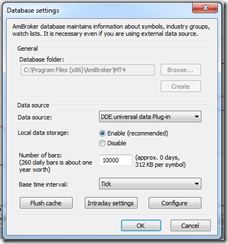
Notice the {Field}!{Ticker} – Field is first, when you open up this window for the first time, these fields are reversed.
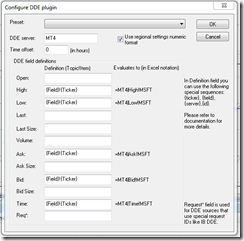
Add the symbol to Amibroker, the same as it appears in MT4, some brokers add some stuff after the symbol, mine was only EURUSD for example. So I added EURUSD to Amibroker. Once you see the green box at the lower right side of Ami, add the symbol to the real time feed and watch the quotes come in.
In MT4, you have to enable the “DDE Server”. Go to “Tools->Options” and check the box.
To see errors, look at the MT4 "Journal" tab. View->Terminal, then goto the new thingy that just opened and click the Journal tab. You might see some errors that begin with "DDE......"
If you have any questions, use Google first, than ask me if your stuck.
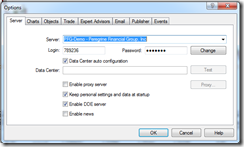
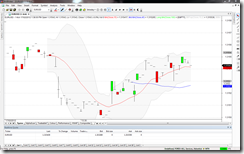
Here are the steps to do this:
- Load historical data into Ami (See this post Forex MSN Data)
- Get streaming data from MT4 to Amibroker
- Find or make AFL and MQL files to interact between the two platforms. I found an MQL file (on a forum) that will read a text file. Now I just need to make the trading system AFL write the text file. I’ll make this code as an AFL include file.
By the way, I’m using this on Windows 7 64 bit.

Notice the {Field}!{Ticker} – Field is first, when you open up this window for the first time, these fields are reversed.

Add the symbol to Amibroker, the same as it appears in MT4, some brokers add some stuff after the symbol, mine was only EURUSD for example. So I added EURUSD to Amibroker. Once you see the green box at the lower right side of Ami, add the symbol to the real time feed and watch the quotes come in.
In MT4, you have to enable the “DDE Server”. Go to “Tools->Options” and check the box.
To see errors, look at the MT4 "Journal" tab. View->Terminal, then goto the new thingy that just opened and click the Journal tab. You might see some errors that begin with "DDE......"
If you have any questions, use Google first, than ask me if your stuck.


Tuesday, February 14, 2012
Interactive Brokers, MSN, and Forex Data to Amibroker
This post may also be helpful – How to Get Forex Quotes from MSN into Amibroker
If you use IB, Amibroker, and TWS to trade Forex, chances are you have been confused with the data feed from IB. Yu might have asked yourself “How do I get daily data from MSN and mix it with intraday data from IB on the same chart?” I hope you didn’t answer yourself, at least out loud!! You could enter EURUSD as a symbol in Amibroker and download daily data from MSN. Then you could enter EUR.USD-IDEALPRO-CASH as a symbol so you can trade it from the Amibroker charts using Tipster Trendlines. But the silver bullet would be to have both data sources on the same chart, and be able to use that chart to place and modify orders.
Why would anybody want to do this? Because I trade Supply and Demand zones and I always look at the weekly and daily zones. They tell me where I am in the universe. Placing a trade with only 1 month of data is not a good idea, its a bad idea.
This is how you do it.
Goto: File->Database Settings->Intraday Settings and make sure “Allow mixed EOD/Intraday data” is checked. See below.

Then enter a new symbol EUR.USD-IDEALPRO-CASH and delete the symbol EURUSD if it exists. If EURUSD exists, the data from MSN will go to that symbol and not where we want it to go.
Goto: Symbol->Information and enter the inputs below
Alias: EURUSD

You can also enter the ticksize and point value, this is helpful if you are using TipsterTrendlines.
Save you work: File->Save ALL
Turn off the data feed from IB TWS or close TWS (bottom right corner of Amibroker, right click, select Disconnect)
Open Amiquote Tools->Auto update quotes
Select the dates – try to load one year to start with. If you select to much data it will not work. You can do something like 2 years at a time to get a large database.
Select MSN Historical as the data source
Make sure Automatic Import is checked.
Start it by pressing the green triangle on the menu
After it finishes, click on EURUSD in Amiquote to make sure the data was downloaded, a text box will open showing a bunch or quotes.
Then go to Amibroker and select daily timeframe for EUR.USD-IDEALPRO-CASH and you should see a huge chart.
Turn on the TWS data feed.
Then select the smallest timeframe and you will see data from IB, streaming.
You might notice that you can see daily data back more than 3 months but if you switch to hourly you wont have that much data. The IB data feed length depends on the number of days to download and the period you selected for the IB database in the database setup. This should be enough o get you started.
If you use Amibroker, I suggest you check out TipsterTrendines, the current users love it. It sends your order instantly based on line you draw on the chart. It’s a cheap solution compared to entering the wrong numbers in TWS.
Hope this help. Spread the word in the forums.
Saturday, February 4, 2012
FM
Here’s a toy a recently purchased. An FM transmitter. Now I can listen to my tunes all over the house in great quality.
I use winamp with 2 plug-ins to make the transmission sound better than the local radio stations.
Here’s a pic of the back of the board after I had to do a mod to the board.

Saturday, January 14, 2012
Canadian Forex Broker and MT4 – Questrade
Questrade offers MetaTrader 4 (MT4)
You heard it here first.
So after MF Global closed up shop I started looking for another broker. I’ve already posted a little bit about this in the past month. I want this broker to be covered under IIROC and CIPF. MG Global was a member of CIPF and if they default on getting my money back to me, CIPF would have stepped in and refunded me 100%. That wasn’t necessary, KPMG successfully got all the money back to me via a check mailed to me.
I’ve tried FXCM and the Canadian broker they hooked up with called Friedburg Direct. Well this set up is bullshit, you can’t open a MT4 account, you have to use FXCM-UK. So after sending in the application and going through the process, the sale guy, YET AGIAN, was wrong wrong wrong wrong. The lesson here is to call customer service of the parent company (usually US for the ones I was contacting), then new accounts, then customers service, get three different people to confirm the account set up. Then call customer service in Canada and see if you get the same answer. So I’ll probably open a small account to test new EA’s in a live platform.
I’ve been using Interactive Brokers and Questrade as well as TD Waterhouse (not to be confused with TD Ameritrade).
Well TD sucks since the commissions are high, the platform is crap, and to get bracket order you have to pay to use the pro platform. So those accounts are being moved now.
Interactive Brokers – great commissions, TWS platform is fine and very robust.They don’t allow RESP or RRSP but I do have an account with them. To bad about the RRSP, had to find somewhere else for that, so I use Questrade. BTW Trade Freedom was bought by some other company.
So I’ve been with Questrade for a while now. There basic platform is crappy too. There is a new platform coming out shortly, I need to check to see if it will do OCA or bracket orders. The big news here is they are covered under CIPF, regulated by IIROC, and they are BETA TESTING MT4. Is that da bomb or what?
So I am about to start demo testing MT4 with Questrade. I’ll keep you posted.
You heard it here first.
So after MF Global closed up shop I started looking for another broker. I’ve already posted a little bit about this in the past month. I want this broker to be covered under IIROC and CIPF. MG Global was a member of CIPF and if they default on getting my money back to me, CIPF would have stepped in and refunded me 100%. That wasn’t necessary, KPMG successfully got all the money back to me via a check mailed to me.
I’ve tried FXCM and the Canadian broker they hooked up with called Friedburg Direct. Well this set up is bullshit, you can’t open a MT4 account, you have to use FXCM-UK. So after sending in the application and going through the process, the sale guy, YET AGIAN, was wrong wrong wrong wrong. The lesson here is to call customer service of the parent company (usually US for the ones I was contacting), then new accounts, then customers service, get three different people to confirm the account set up. Then call customer service in Canada and see if you get the same answer. So I’ll probably open a small account to test new EA’s in a live platform.
I’ve been using Interactive Brokers and Questrade as well as TD Waterhouse (not to be confused with TD Ameritrade).
Well TD sucks since the commissions are high, the platform is crap, and to get bracket order you have to pay to use the pro platform. So those accounts are being moved now.
Interactive Brokers – great commissions, TWS platform is fine and very robust.They don’t allow RESP or RRSP but I do have an account with them. To bad about the RRSP, had to find somewhere else for that, so I use Questrade. BTW Trade Freedom was bought by some other company.
So I’ve been with Questrade for a while now. There basic platform is crappy too. There is a new platform coming out shortly, I need to check to see if it will do OCA or bracket orders. The big news here is they are covered under CIPF, regulated by IIROC, and they are BETA TESTING MT4. Is that da bomb or what?
So I am about to start demo testing MT4 with Questrade. I’ll keep you posted.
Subscribe to:
Posts (Atom)




 Posts
Posts

