Introduction
Are you ready to take your trading game to the next level? Look no further
than Anchored Volume Weighted Average Price (AVWAP), the most powerful
technical analysis tool available for traders of all levels.
Whether you’re an experienced trader or just starting out, AVWAP can help
you make more informed trading decisions by providing an objective
measurement of supply and demand for a specific security.
In this article, we’ll show you how to use AVWAP effectively and provide
real-world examples of how traders have used it to make profitable trades.
You’ll learn how AVWAP combines price, volume, and time to give you a better understanding of the emergent sentiment of a security from
that moment forward. We’ll also show you how to analyze AVWAP across
multiple timeframes and use it as a stop-loss strategy.
The AVWAP has become increasingly popular among traders, especially those
engaged in intraday trading. The AVWAP is a modification of the Volume
Weighted Average Price (VWAP) indicator that incorporates a price bar or
anchor point chosen by the trader. This provides a more objective
measurement of supply and demand for a specific security, regardless of your
level of experience in trading.
One of the most important advantages of the AVWAP is its ability to combine
price, volume, and time to give you a better understanding of the emergent
sentiment of a security from that moment forward. Whether you are an
experienced trader who prefers to analyze price action over a longer period
of time or a new trader focused on short-term trading, the AVWAP is a
versatile tool that can be used effectively on any timeframe.
As you use the AVWAP to analyze the trend of a security, you'll want to pay
close attention to the direction and slope of the indicator, as well as how
far above or below price action is in relation to the AVWAP. This can
provide valuable insights into whether a security is overbought or oversold,
helping you identify potential trading opportunities.
VWAP vs AVWAP
VWAP is Volume Weighted Average Price
AVWAP is Anchored Volume Weighted Average Price
If you're new to trading, you may have heard about VWAP and AVWAP and wondered
what the differences are. Essentially, VWAP is a calculation that provides an
average price of a security based on its volume throughout the day. In
contrast, AVWAP is a modified version of VWAP that allows traders to anchor
the calculation to a specific price bar, giving them a more objective
measurement of supply and demand at a specific point in time.
The VWAP is widely used by institutional traders to assess market trends and
determine optimal entry and exit points. It is an ongoing calculation that is
updated throughout the day, and it serves as a benchmark for institutional
traders.
On the other hand, AVWAP gives traders more flexibility and versatility by
allowing them to anchor the calculation to any visible price bar. The AVWAP
continues from the anchored point to the right side of the chart, making it a
powerful tool for traders who want to analyze the market trend from a specific
point in time.
While both indicators can be used to identify areas of support and resistance
on the chart, the AVWAP can provide a more accurate measure since it considers
a specific point in time. Traders can use both VWAP and AVWAP to determine
potential entry and exit points, as well as to set stop-loss orders.
AVWAP formula
The formula for Anchored VWAP is as follows:
VWAP = (Sum of (Price x Volume) for the Anchored period) / (Sum of Volume for
the anchored period)
To calculate Anchored VWAP, the trader must first determine the time period
over which the VWAP will be calculated. This time period is known as the
anchored period.
Next, the trader must identify the anchor point, which is the specific time in
the past that will serve as the reference point for the VWAP calculation.
The trader then calculates the total volume and total value of all trades that
have occurred within the anchored period, starting from the anchor point.
Finally, the trader divides the total value by the total volume to arrive at
the anchored VWAP. Anchored VWAP can be applied to various trading
instruments, such as stocks, exchange-traded funds (ETFs), futures contracts,
and options.
It is typically used on securities with high liquidity and volume, as these
securities tend to have more reliable VWAP readings. However, it may not be
suitable for symbols that do not have volume, such as an index or some forex
pairs.
Anchored VWAP is best used during periods of high volume and volatility, as it
helps to smooth out short-term price fluctuations and provide a clearer
picture of the longer-term trend. However, it may not be as useful during
periods of low volume and volatility, as the VWAP may not accurately reflect
market sentiment.
Approaches
By anchoring the VWAP to a specific point in the past, traders can filter
out short-term fluctuations and focus on the longer-term trend. In this way,
the Anchored VWAP can be used in conjunction with important events, as well
as for timing buy trades.
One of the approaches that traders can use when using Anchored VWAP in
conjunction with important events is to anchor the VWAP to the time period
surrounding the event.
For example, if the event is scheduled to take place at 2:00 pm, traders can
anchor the VWAP to the time period from 1:00 pm to 3:00 pm. By doing this,
they can gain a sense of how the security has been trading in the lead-up to
the event, which may help them identify potential buying or selling
opportunities.
Another approach is to use anchored VWAP as a reference point after the event
has taken place. Traders can anchor the VWAP to the time period immediately
following the event and use it as a way to assess how the market is reacting
to the news. If the security is trading above the anchored VWAP, it may be a
sign of bullish sentiment, while if it is trading below the anchored VWAP, it
may be a sign of bearish sentiment.
For timing buy trades, one approach that traders can take is to buy near the
anchored VWAP. Some traders may look for opportunities to buy a security when
it is trading near its anchored VWAP. The idea is that the security may be
undervalued if it is trading below the anchored VWAP, and therefore may have
potential for price appreciation.
On the other hand, traders can also wait for the security to move above its
anchored VWAP and then enter a buy trade. This can be seen as a sign of buying
momentum, and may indicate that the security is starting to trend upwards.
Traders can also wait for the security to cross above its anchored VWAP and
then enter a buy trade. This can be seen as a bullish signal and may indicate
that the security is breaking out of a sideways trading range.
It's important to note that these are just a few examples, and there are many
other ways that anchored VWAP can be used in trading.
Traders can also use the direction and slope of the AVWAP to identify the
trend of the security. If the AVWAP is sloping upwards, it can indicate that
the security is in an uptrend, while a downward sloping AVWAP can indicate a
downtrend. Traders can use this information to identify potential entry and
exit points in the market.
Moreover, traders can use the distance between the security's price action and
the AVWAP to identify potential support and resistance levels. If the price is
trading above the AVWAP, it can indicate that there is support for the
security at that level, while trading below the AVWAP can indicate resistance.
By using the AVWAP in conjunction with other technical analysis tools, such as
trendlines and moving averages, traders can identify key levels in the market
and make informed trading decisions.
Another approach is to use the AVWAP on multiple timeframes. The AVWAP can be
used on any timeframe and is actually best used on multiple timeframes. By
analyzing the AVWAP on different timeframes, traders can get a better
understanding of the long-term trend of the security and identify potential
trading opportunities. For example, if the AVWAP is sloping upwards on both
the daily and weekly timeframe, it may indicate a strong uptrend, indicating
that the security is in a longer-term uptrend.
Where to anchor
When it comes to anchoring VWAP, it's important to choose the right events to
anchor from. These events should be significant and have the potential to
impact the price of the security being traded.
One common anchor is the previous highs and lows in the chosen time frame.
Anchoring from the previous swing high or low can provide traders with the
average price that traders paid on the run-up, which can act as a support
level when the price tries to go below it. Year-to-date, month-to-date, and
week-to-date AVWAPs are also important anchors as they act as strong support
and resistance levels. They show the average price that traders paid for their
positions and traders tend to defend these levels.
Additionally, gap-ups and downs can also serve as great anchors since they
represent significant price movements with a high level of market
participation.
Earnings reports are another important event that can serve as an anchor for
VWAP. Traders can anchor the VWAP from the day after earnings to track users
who bought or shorted the stock after earnings. This can sometimes coincide
with gap up and downs because they sometimes happen right after earnings.
Other events that traders may consider include economic releases, central bank
meetings, political events, and natural disasters. Economic releases, such as
GDP, employment figures, and inflation data, can have a major impact on
financial markets, providing insight into the health of the economy and
influencing central bank policy.
Central bank meetings can also indicate the direction of interest rates and
other key economic indicators.
Political events and natural disasters can also disrupt economic activity and
lead to price movements in financial markets.
Ultimately, the choice of anchor point will depend on the trader's individual
trading strategy and the specific security being traded. By choosing the right
anchor points, traders can gain insight into the average price paid by other
market participants and use this information to make more informed trading
decisions.
Using anchored VWAP as a reference point after the event
Using anchored VWAP as a reference point after an event can provide traders
with valuable insight into market sentiment and potential trading
opportunities. For example, let's say that a company announces
better-than-expected earnings results, causing a surge in its stock price. A
trader can anchor the VWAP to the time period immediately following the
earnings announcement and use it as a reference point to assess how the
market is reacting to the news.
If the stock price is trading above the anchored VWAP, it may indicate that
there is bullish sentiment in the market, and the price is likely to
continue its upward trend. Conversely, if the stock price is trading below
the anchored VWAP, it may indicate that there is bearish sentiment in the
market, and the price is likely to continue its downward trend.
Traders can use this information to make informed trading decisions, such
as entering a long position if the stock is trading above the anchored VWAP
and a short position if it is trading below it. They can also use the
anchored VWAP as a reference point to set stop-loss orders or take-profit
levels, based on the level of support or resistance provided by the
VWAP.
Buying near anchored VWAP
Traders can also employ the anchored VWAP strategy by looking for buying
opportunities when a security is trading close to its anchored VWAP. This
strategy is based on the assumption that the security might be undervalued
if its current price is below the anchored VWAP, which could indicate
potential for price appreciation.
For instance, if a trader has anchored the VWAP to the start of the year
and the security is trading in proximity to the anchored VWAP, they might
consider this a favorable time to buy. By purchasing the security close to
the anchored VWAP, traders can potentially benefit from undervaluation and
position themselves for future price gains.
Buying when the security moves above anchored VWAP
An alternative method that traders can use with anchored VWAP is to wait
for the security to surpass its anchored VWAP and then initiate a buy trade.
The underlying idea behind this approach is that when a security is trading
above its anchored VWAP, it may signal the start of an upward trend and
present an opportunity for buying momentum.
For instance, suppose a trader has anchored the VWAP to the start of the
current quarter and the security has recently crossed above the anchored
VWAP. In that case, they may consider this a bullish indicator and enter a
long position. By purchasing when the security surpasses the anchored VWAP,
traders can capitalize on buying momentum and potentially profit from price
appreciation.
Buying when the security crosses above the anchored VWAP
To potentially take advantage of a breakout, traders may wait for a
security to cross above its anchored VWAP before entering a buy trade. This
approach is based on the belief that a security crossing above its anchored
VWAP is a bullish signal, indicating a potential breakout from a sideways
trading range.
For instance, a trader could anchor the VWAP to an important news release
and wait for the security to cross above the anchored VWAP before entering a
long position. This way, they could potentially benefit from the breakout
and position themselves for potential price appreciation.
When the direction changes
Throughout our analysis of the different anchors used with Anchored Volume
Weighted Average Price (AVWAP), we have examined how the price tends to
respond to them as either support or resistance levels. However, it is
important to keep in mind that these levels are not always absolute and can
sometimes fail to hold. Generally, it is often observed that these levels
tend to break down when the AVWAP begins to flatten out.
This flattening of the AVWAP can indicate a shift in market sentiment and a
potential change in direction of the security's price. As such, traders may
want to consider adjusting their trading strategy accordingly, such as by
moving stop-loss orders or re-evaluating their position. It is also
important to note that while the AVWAP is a useful tool, it is not
infallible, and traders should always be vigilant and incorporate a range of
technical and fundamental analysis techniques into their trading
decisions.
AVWAP as a stoploss
Anchored Volume Weighted Average Price (VWAP) is a versatile technical analysis
tool that traders can use in multiple ways, including as a potential stop-loss
strategy. Here are five examples of how traders can use anchored VWAP as a
stop-loss strategy:
-
Setting a percentage below the anchored VWAP: As mentioned earlier,
traders can set a stop-loss order at a certain percentage below the
anchored VWAP. This can help limit potential losses if the security's
price starts to move against the trader.
-
Using multiple anchored VWAPs: Another approach is to use multiple
anchored VWAPs, each with a different time period, and set stop-loss
orders based on the distance between the current price and the anchored
VWAPs. This can provide a more comprehensive view of the security's
trend and help traders make more informed decisions.
-
Combining with other technical indicators: Traders can also use
anchored VWAP in combination with other technical indicators, such as
Relative Strength Index (RSI), Moving Average Convergence Divergence
(MACD), or Bollinger Bands, to set stop-loss orders. This can help
provide a more nuanced and accurate view of the security's trend and
potential risk.
-
Adjusting the stop-loss based on market volatility: Another approach is
to adjust the stop-loss based on the market's volatility. For instance,
traders can set a wider stop-loss in a more volatile market to avoid
getting stopped out too early or too frequently.
-
Using fundamental analysis: Finally, traders can also use fundamental
analysis to set stop-loss orders. By assessing a company's financial
health, business model, and industry trends, traders can determine the
appropriate level of risk and set stop-loss orders accordingly.
It's important to note that using anchored VWAP as a stop-loss strategy is
just one possibility, and there are many other ways that stop-loss orders
can be used. It's always a good idea to carefully consider your own
investment objectives and risk tolerance before making any trading
decisions. Additionally, it's important to keep in mind that stop-loss
orders do not guarantee a certain price, and the security may be sold at a
price that is different from the stop-loss price if the market moves
quickly.
Statistical analysis techniques
Statistical analysis techniques are an essential tool for evaluating the
performance of anchored volume weighted average price (VWAP). By
incorporating statistical data into an analysis of anchored VWAP, traders
can gain a more nuanced understanding of the indicator and how it is
performing.
For example, mean reversion analysis is one statistical technique that can
be used to analyze anchored VWAP. This involves comparing the security's
current price to its anchored VWAP. If the security is trading above its
anchored VWAP, it may be a sign that it is overvalued, and mean reversion
analysis can assess the likelihood that the security's price will revert
back towards the anchored VWAP.
Another statistical analysis technique is to evaluate the security's
volatility. High volatility can increase the risk of trading, and the
anchored VWAP may be less reliable as a reference point. On the other hand,
if the security has low volatility, it may be less risky to trade and the
anchored VWAP may be more reliable as a reference point.
Correlation is another approach used to evaluate anchored VWAP. By
assessing the correlation between the security's price and its anchored
VWAP, traders can determine whether the anchored VWAP is a reliable
reference point. A strong correlation indicates that the anchored VWAP is a
useful reference point, while a weak correlation suggests that the anchored
VWAP is less reliable.
Traders can also use statistical measures such as the standard deviation
and coefficient of variation to assess the reliability and stability of
anchored VWAP. For instance, calculating the standard deviation of anchored
VWAP over a specific time period can measure the dispersion of the data and
assess the reliability of the indicator. Similarly, the coefficient of
variation is a measure of the relative dispersion of a dataset that can
provide a useful perspective on the stability of the indicator.
In addition to these statistical measures, traders can compare anchored
VWAP to other indicators or benchmarks to assess its performance and
usefulness in a particular trading strategy. For example, comparing anchored
VWAP to the simple moving average (SMA) of a security can help traders
determine how well the indicator is tracking the underlying trend.
It's essential to use a range of technical and fundamental analysis tools,
including statistical analysis techniques, and to carefully consider your
own investment objectives and risk tolerance before making any trading
decisions. While these are just a few examples of statistical analysis
techniques that can be used with anchored VWAP, there are many others that
traders can explore. Incorporating statistical data into an analysis of
anchored VWAP can provide a more comprehensive view of the indicator and
help traders make more informed decisions about how to use it in their
trading strategies.
Planning Trades with AVWAP
When utilizing the AVWAP indicator for trade planning, it is recommended to
anchor it to significant events, such as the start of the year, day, or
relevant highs/lows for your timeframe. The direction and slope of the
AVWAP, as well as its distance from price movement, should also be
considered.
If you're looking to initiate a buy trade, it is advisable to wait for a
dip (pullback) and then buy into strength. To do so, start by determining
the trend on a larger timeframe (e.g., uptrend on the daily chart,
characterized by higher highs and higher lows). Anchor the AVWAP to the low
of the trend's starting point and look for price touches, or handoffs, to
determine the new anchor point.
Next, move to a lower timeframe and anchor the AVWAP to the most recent and
relevant high and low. This will help identify who is in control of the
price action or if the market is in a state of equilibrium. Look for price
movement above the AVWAP from the high, while the AVWAP remains flat or
rises, as this indicates that buyers are in control and presents a buying
opportunity.
For stop placement, refer to the AVWAP from the recent low. When buyers are
in control and stop losses are placed below the most recent or relevant
lows, a setup is created. By following this approach, you can utilize the
AVWAP indicator to help plan and execute trades effectively.
Example Trades
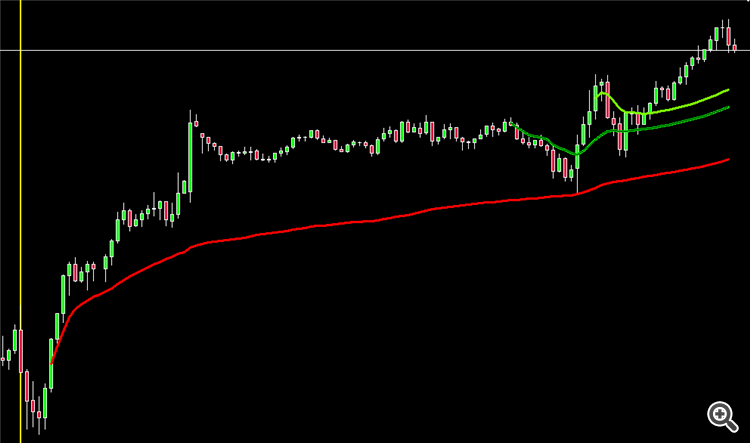
In the chart below of US500 (S&P500), the yellow vertical line represents
the opening of the day at 9:30 am EST. The red AVWAP is anchored to the momentum
bar, shortly after the open. As you can see, the AVWAP was defended during the
day's trading session, indicating that the buyers were in control. If you were
to consider entering on a pullback, you could wait for the AVWAP to be flat to
rising, with the price above it. Then, you could anchor an AVWAP to a recent
swing high and wait for the price to decline, then rise above the AVWAP to enter
the trade. Finally, you could anchor an AVWAP to the low that was just created
to use as a stop, using it as a guide to tell you which higher low is relevant
for stops.
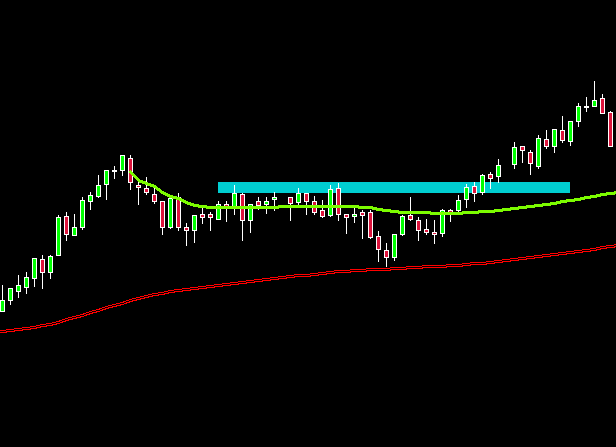
The following chart showcases an example of how the AVWAP can be utilized to
identify breakouts. Firstly, anchor the AVWAP to the recent swing high and low
to establish a reference point. Observe how the AVWAPs begin to converge and
move closer together, indicating an impending price movement. Once the price
breaks above the recent highs and remains above the AVWAP, it signifies that
buyers have taken charge. This is an opportune moment for traders to consider
entering a long position.
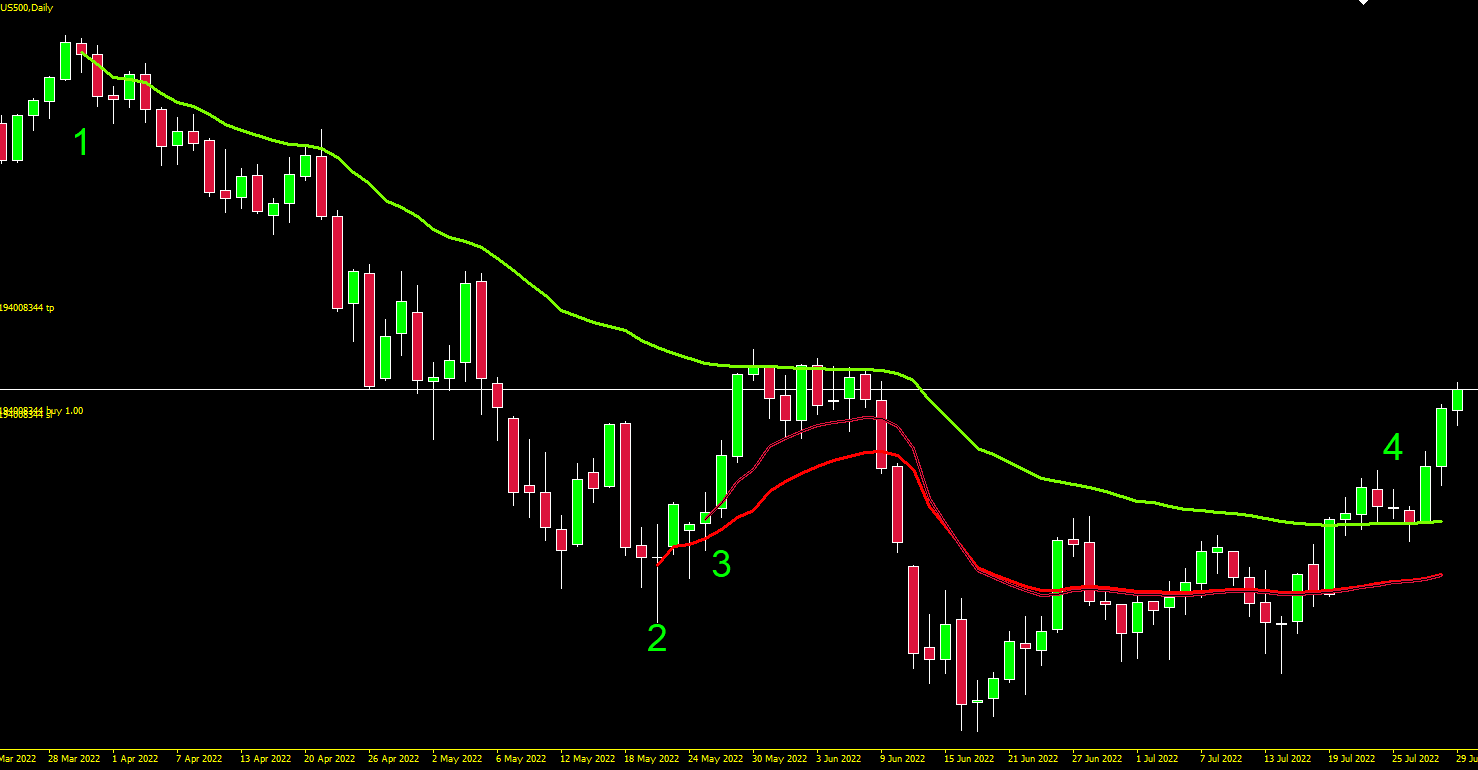
Daily Chart Example
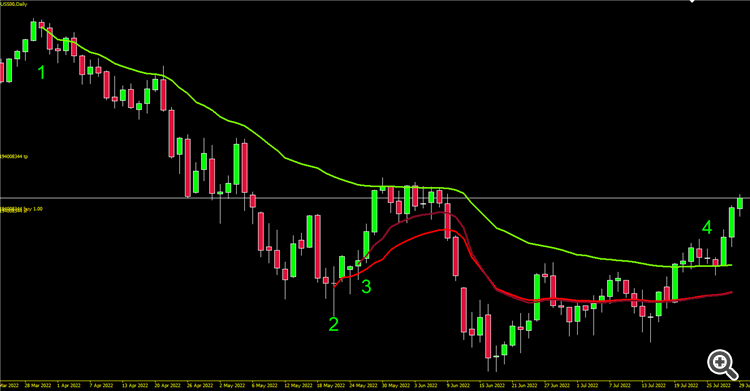
The chart below has 3 AVWAPs with numbers at important points.
1 - AVWAP anchored to the top. See how the downtrend pullbacks respect
this line, you can use this to enter low risk trades.
2 - In a downtrend, you want to know when to enter for a short. Anchor to
a bottom, when price cuts down thru its time to sell as sellers are in
control.
3 - You can also anchor from where the momentum began, giving you an
early warning where you can use a tighter stop.
4 - Once the down trending AVWAP was cut through upwards, it flattens out
and price moves up. Above a flat to rising AVWAP at this point is telling
you that buyers are in control.
Where can I get this indicator?
AVWAP can be used on a variety of trading platforms that support technical
analysis and charting tools. However, it's important to note that the
availability and functionality of AVWAP may vary between platforms.
Additionally, as mentioned earlier, AVWAP may not be suitable for all types
of trading instruments, such as those that don't have sufficient volume or
liquidity. Therefore, it's important for traders to evaluate their trading
needs and choose a platform that offers the appropriate tools for their
specific trading strategy.
There are several other ways to access Anchored VWAP for MT4 or MT5,
depending on your preferences and experience with the platform. Here are some
options:
-
Download a third-party indicator: Many trading communities and websites
offer custom indicators for MT4, including Anchored VWAP. You can search
for "Anchored VWAP MT4 indicator" on your preferred search engine and
browse through the results to find a reliable source. Make sure to read
reviews and check the compatibility with your version of MT4 before
downloading and installing any indicator.
-
Code it yourself: If you have programming skills or access to a
developer, you can create your own Anchored VWAP indicator for MT4 using
the MQL4 language. The MQL4 Documentation provides a comprehensive guide
on how to code custom indicators and integrate them into the MT4
platform.
-
Hire a freelancer: If you don't feel comfortable coding yourself, you
can hire a freelance developer to create the Anchored VWAP indicator for
you. Websites like Upwork or Freelancer.com allow you to post a job
offer and receive bids from qualified developers. Make sure to specify
your requirements and budget clearly and choose a reputable freelancer
with good feedback.
Once
you have the Anchored VWAP indicator installed on your MT4 platform, you can
use it to analyze the price action of your preferred trading instruments and
make informed trading decisions.Here is a partial list (at the time of writing) of Anchored VWAP indicators
available on mql5.com for both MT4 and MT5 platforms:
-
This is an indicator that I wrote and is available for purchase on MQL5.com for the MT4 platform:
Multi Anchored VWAP: This indicator automatically displays multiple
Anchored VWAPs (AVWAPs)
Additional Reading
Here are some suggested resources for further reading on anchored VWAP and
its usage in technical analysis:
-
Investopedia: This website provides a comprehensive guide to anchored
VWAP, covering its calculation and application in trading.
-
StockCharts: This website offers a range of technical analysis tools,
including anchored VWAP. You can find a brief overview of the indicator
and how to use it in chart analysis.
-
TradingView: This social platform for traders and investors has a large
user community that shares their charts and analysis, including those
that use anchored VWAP. You can find a wealth of information on the
indicator by searching the platform's forums and blogs.
-
Online trading courses: Many online trading courses cover anchored VWAP
and other technical analysis indicators. These courses can provide a
deeper understanding of the indicator and its use in various trading
strategies.
Conclusion
In conclusion, the Anchored Volume Weighted Average Price (AVWAP) is a
valuable tool for traders seeking to measure the average price of a security
over a specific period, with the anchor point being a specified time in the
past. It can be customized to fit the needs of individual traders and is best
used during periods of high volume and volatility. While no indicator is
perfect, the AVWAP provides valuable insights into the sentiment of the market
or individual stocks by combining price, volume, and time. The Multi Anchored
VWAP can be added to MT4 to help traders understand who is in control, buyers
or sellers. Experimenting with various anchor points in targeted markets and
stocks can help traders recognize the value of the AVWAP. Whether used as a
stand-alone study or viewed with other indicators, the AVWAP is likely to
become a favored tool in any trader's analysis and strategy.








 Posts
Posts

