Friday, September 14, 2012

MultiCharts Discretionary Trader


MultiCharts was previously available for free, the catch is that trades could only be placed manually, no automation.  It did however allow for chart trading, and it did a pretty good job at it.  

You could place orders by clicking on the chart, with multiple targets.  You could attach strategies such as breakouts or limit orders and as bracket orders as well.  I didn't like the fat that it waited until the order was filled before it placed stops and targets (bracket).

The software has the ability to connect to a bunch of brokers as well, for order placement.

If your looking for this trading platform, you can probably find the torrent for it.  I am fairly certain it still works as a free version to connect to a pile of brokers, but I'm not sure how buggy it is.

I wrote a post a while back on this platform, that it was GONZO.  They took the free version off the web site.  The paid platform looks very kick-ass if your a full time trader.  
If you want to read more about it here is the MultiCharts web page, click on the "Compare editions" on the left side.  Also, mouse over the "MultiCharts" on the top to see a huge menu to learn more about this package.  I don't use it but if I was a full time trader I would seriously consider it.


Thursday, August 30, 2012

How to program AFL in Amibroker and MQL for MT4

I’m a self taught programmer, the only classes I ever took part in were in high school.  Back in the day of the cards – you had to use a pencil on some cards then feed them into a machine and it ran your program.  I learned Fortran first.  Then a tried basic language on a Commodore 64 or something, long time ago, can’t remember the details.

If you want to learn Amibrokers AFL or MT4 here are a few suggestions:

Take a night course in programming, not sure which language is close to either of these but if you ask in some forums or Google for similarities you’ll find answer.  If you already know a language, don’t bother with school, jump to step 2.  

You first need to learn logic flow and what functions are and what object programming means, your looking learn to the concept of programming and how you write a program, run it, and debug it.  Then you can cross utilise this skill with any other language.  It takes some self learning. 

The next step, load up a small program and try to understand it. If you put your cursor on a function (which usually highlighted in blue) and press F1 help opens up and you can read about the function.  Then read the help docs on program flow to understand how the program executes. 

Next – load up a bigger program and understand the flow.  Make some small changes, maybe try to print stuff to the screen or alerts menu, or send en email. 

Next – read a tutorial, free one are always offered on line.  You can start with this as step one as well but after you play with code you should go back to a tutorial and read it again.  Read the tutorial once a week for 3 weeks, read it to understand it.  Read it when the kids are in bed, you need to focus un-interrupted.

Next – have an idea of what you want to do, then steel some code as a starting point and modify it to suit your coding goal.  here’s an example.  Load up the stochastic indi.  Make an indicator in one single window with 3 stochastic, with either K or D.  Set them to 8, 21, and 55 periods.  Run it on a 15 minute timeframe.  Now add another that is set to a forced time frame of 4 hours and is an average of the 8, 21, and 55 periods.  Plot the four lines.  Use the same colour for the 15 minute and a thicker and different color for the 4 hour.

Then, ask yourself this – am I coding because I like it and trading is secondary, or am I coding for a purpose? I got into the rut of coding because it was a challenge. I wasn’t learning to trade.  Then I decided to just watch the screen and price action and learn to trade. Then code for what I wanted to do.

And the best for last – I don’t think I have ever written a program from scratch – I always start with something that has been done already, then change it, add to it, delete stuff, and make adjustments.  After a while there might not be anything left of the original, but it sure make it easier to start.

Tuesday, August 28, 2012

Canadian Forex Accounts

If you have the option to open an account in Canada for Forex, you will gain a great protection plan!

IIROC is the regulator in Canada, here's the blurb from there site.

Investment dealer insolvency doesn’t happen very often, but if it does, the Canadian Investor Protection Fund (CIPF) is here to ensure your cash and securities are returned to you, within defined limits.

If you have an account with a CIPF Member you have CIPF protection - coverage is automatic for all eligible customers. For more information, go directly to our Coverage Policy.CIPF is sponsored by the Investment Industry Regulatory Organization of Canada (IIROC) and is the only compensation fund approved by the Canadian Securities Administrators for IIROC Dealer Members. All IIROC Dealer Members are CIPF Members.

So, for anyone outside of Canada, take a look at this page.... it tells you what and who is covered under CIPF. http://www.cipf.ca/Public/CIPFCoverage/ ... olicy.aspx

The sad part for US residents is that the Canadian regulator respects the US regulaor.  US regulator does not allow US residents from opening accounts outside the US.

From the CIPF web site

Question: Does it matter if I do not live in Canada, or if I am not a Canadian citizen or a Canadian resident?

Answer: No. CIPF coverage does not depend upon residency or citizenship. CIPF coverage is available to you when you open an account with a CIPF Member.

Canadian Brokers offering MT4


FXCM uses a company called Friedburg Direct.  I have an account with them.  Here is the MT4 FXCM page.
Over 5K you also get a free VPS. 1:50 leverage - and that's OK with me!! 


I know that Questrade is going to be introducing MT4 some time in the near future. 


Forex.com (Gain Capitol) - good spreads. free VPS with 5K or more.

Monday, August 27, 2012

Tipster Trendlines - Amibroker

Update - I've closed my Interactive Brokers account where I use Amibroker and Tipster Trendlines (for Amibroker).  I'm using MT4 now and TT2P found at Stevehopwoodforex.com forum.  You can find the link at the top of this blog.  I will be dropping the price of the Amibroker code shortly and the support will be limited.  The code still works for the current version of IB TWS and Amibroker.

Sunday, August 26, 2012

My Brokers

I was MF Global and they blew up - I got all my money back thanks to the Canadian regulation system.  I'll write about that shortly.

I was then with PFGBest and they blew up - the account was in the US and my money is stuck in the bankruptcy fiasco.

I'm now with Forex.Com (Gain Capitol) and FXCM Canada.

Both accounts are held in Canada and have no hedging restrictions or FIFO rules.  Leverage is 100:1.
I use MT4 on both.  Both allow comments and magic numbers for full MT4 functionality.  Spreads are better on the majors at Forex.com.

So far, so good.  I just started trading the accounts and I'll post links to performance on the page listed at the top of this blog.

Monday, July 16, 2012

PFG Best News

By now you have probably heard what happened with PFG Best.

If you have been caught up in this event and wish to speak to someone at PFG, here is a link to the complete company phone directory.  Screen capture it before it goes away.  And while your at it, leave a voice mail for the top dog, his number is on the list.

PFGBest Phone Directory

Monday, May 14, 2012

What does a top look like? Why does price turn?

In this post, I'll discuss the USDCAD tops formed in 2008 and 2009.  Before I set out to trade any pair or instrument using this method as defined by Sam, I examine the chart, all the evidence is there for you in history.  Some forex pairs I just don't trade because I can't see many areas where price respected supply and demand as Sam explains it.
Before I get into this, I want to say that I wasn't much of a trader in 2008, my methods were different, and I never traded any of these tops. It is also easy to go back and say would have, could have, but you can learn from the set-ups from the past. They are not hard to spot if you go back and look at charts, scroll forward and see if it would have worked out for you. Write down winners and loser and approximate pips. Do some quick rough back testing to see if it works for you, or how good you are at picking levels.
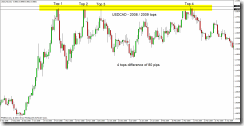
Let’s take a look at the USDCAD chart.  Here is a global view of the tops I'm looking at, label Top 1 to Top 4.  The difference between all the highs is only 80 pips, as shown on the daily chart.  Using the daily or weekly we can see some obvious tops. These are not low volatility moves, mistakes, intraday hiccups, or noise. The chart below is daily bars so there are lots of trades in each bar. The difference between the 4 highs shown in yellow is only 80 pips. Look at the rejection of top 3, price just went screaming away from 1.3000, that tells me lots of traders were prepared to take that trade. Top 3 sped away the fastest but to be honest, the first three tops all screamed away from 1.3000 quickly. When I say quickly, don’t get excited like we are racing cars here. Look at the zoom shots of the chart, count the bars. It takes time for price to move – this is the patience factor. Once you place the trade, walk away because it’s like watching paint dry. The only time I watch the chart is when I day trade ES or currency futures on my Interactive Brokers account.
The first 3 tops actually looks like an ascending triangle, and this is “supposed” to break to the upside! Well it didn’t. So much for the breakout trade. A failed breakout is sometimes a bull trap! Look at top 4 for that! The highest of all and falls away very quickly.
Top 1, 2, 3 and 4 (below)
usdcad tops
The black lines are the highs, the top most and bottom most high. The blue line is 1.3000.
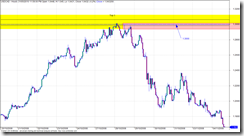
Top 1 - Initial move almost exactly to the huge round number of 1.3000.  Wait for the reaction at 1.3000.  Price almost always will re-visit the area where it turned and shot away.  When it did re-visit the area, 16 hours later, look where it stopped and turned.  Right where Sam tells you the "zone" is located.  Price didn't penetrate that zone very far.  The zone in Top 1 is shown with the red rectangle.  Remember, next time price gets back here, it will most likely go a bit deeper into the "zone".  If you didn't catch this trade, remember to watch price later if and when it does get here.  The only reason to take this trade would have been for a bounce off 1.3000, or the re-test of this area 16 hours later.  Price was in an up trend so the 16 hour re-test would have been a low risk trade, probably seen by those watching the 1 or 4 hour time frame.
Top 1 (below)
Top1 zoom
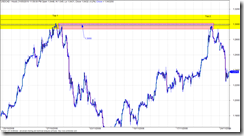
Top 1 and 2 - Zooming in on top 1 and top 2 on an hourly chart to see what the tops look like up close.  Both times price spent between 1 and 4 hours in the area, so it took some time for the orders to work and process until the price eventually dropped.  Top 1 you can see a quick drop, quick as in it took hours of red candles before retracing.  The retrace went right into the sweat spot to short (Sam Seiden Supply and Demand).  This could have been a low risk entry, but you wouldn’t have known that this would be the turning point.  The only thing s you had to go on were the huge round number of 1.3000 and the supply area (red box).  But it offered a low risk entry with a stop just above the previous top hours earlier.
Top 1 and 2 (below)
USDCAD Top 1 & 2
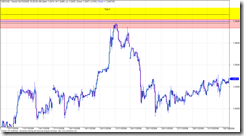
Top 2 - (below) came right up into the sweet spot for the short.  You should have seen this coming weeks in advance, and placed a limit (pending) order.  It’s entries like this that I would lean hard on the risk, I typically do a 2% risk but when the planets all line up I’ll crank it up to 5% or 10%.  Read about the Kelly calculation to get an idea of the max risk you should trade, I will max out at 10% or 20% Kelly.
Top 2 (below)
top 2
Top 2 and 3 – Top 2 has already depleted some of the order from Top 1, so as price approaches you should be thinking that price might go deeper into the zone to take out some of the orders.Top 3 did go deeper into the zone, and there must have been traders waiting because it was sent screaming away.
Top 2 and 3 (below)
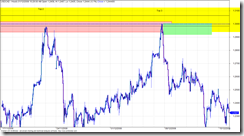
top 2 and 3
Top 3 and 4 – Why did Top 4 penetrate Top 3 if Top 3 was so powerful at sending price back down?  Well Top 4 penetrated the level even more, it actually made a new high. Ever notice how price breaks out like that?  I bet you do, everyone gets burned like that looking for the breakout.  Well, the way the experts explain it is like this…. Top 4 penetrates even deeper, hen makes a new high.  Break out traders are waiting and jump in but there are not enough of them to push price past all the experts waiting for the breakout traders.  They jump in with lots of cash and drive price down.  There are no willing buyers to keep it going, it’s “overbought” or just plain to much for the big money to pay, they don’t pay retail.  This sounds like a good explanation but it really doesn’t matter, all you need to remember is the third or fourth test could go either way so keep you stop close by so you don’t get hammered.  Nobody knows which way it will go. 
Top 3 and 4 (below)
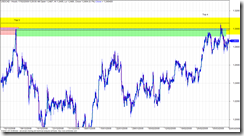
top 3 and 4
What did we learn?
When you watch football, where is the “line” on the filed that makes you almost sure something is about to happen on the score board? The goal line. So if you could get the same odds for a bet on the next play to be a touchdown, would you bet when the ball was on the 30 yard line or the 1 yard line? Wait for price to get to the goal line. And understand what makes price move – it’s not a bunch of candles that all line up, look for where the order sit, price move from these areas in a big way. Memorise the odds enhancers. Search with Google until you find the odds enhancer file, one document that is pretty good is called “BS Trading”.
The lesson here, or what you need to take away is that you can figure about how to trade simply by using the data you already have.  Look for obvious turning points, circle them and make notes.  Study the chart.  Remember that longer term charts are more reliable.  Inside of 1 hour is choppy and sometimes unpredictable so don’t use it to study.  If you want to scalp under 1 hour go for it, but make sure there is movement and your doing it when at least two markets (up to 11am EST) are open.  I look at the daily then zoom into the 4 hour for a better look, sometimes I use the 1 hour for a closer look but I don’t use the 1 hour to study.
Use your software playback feature or the function key that lets you advance a bar at a time.  You might also notice differences between pairs.  The EURUSD seems to work well with supply and demand, but some others like CHF are all over the place and I have yet to find and rhythm, rhyme, or reason for how it behaves so I generally stay away from it.
Try out the trading games on the net, I posted about that earlier.
If you want to know more about Sam Seiden, look at Trading Academy or Fxstreet.com for recorded webinars.

Friday, April 13, 2012

Risk Management

This is a great example of how math impacts your results. I use 2%.

This is worth watching - but you must also understand it and remember it !!


Tipster Trendlines 3.2a - Visually Trade from the Chart

A video on the new version


Saturday, April 7, 2012

Tipster Trendlines for Amibroker Group (Forum) on Google

I opened up a discussion group, if you have purchased Tipster Trenlines you should have received an email invite for this closed invitation only group.


If you didn't get the invite, send me an email.


Tipster Trendlines


Visit this group

or here

Disclaimer

The information presented on this site is for educational and entertainment purposes only. This site contains no suggestions or instructions that you must follow, do your own research and due diligence before committing your cash to the markets. Your on your own.