Friday, March 2, 2012

magic stick versus trading sticks

Either way you compare these two they are both not for me.

You can read about them here….

http://www.4xcircle.com/blog/

http://www.forexpeacearmy.com/public/review/www.4xcircle.com – for comments and user reviews, assuming what you read is by real people not affiliated with them. 

and here is the price at http://www.forexmoneytrendline.com/

$500.  Put away your reading glasses, it says five hundred bucks!!!!

Learn to trade with price action and supply and demand, then get the FREE TipsterTrendlines for MT4.

Here is the link for the free stuff.

Thursday, March 1, 2012

Trading Mentor…. or not?

I received some email asking about trade mentoring.  As I have never taking a trading course or had a mentor I’m looking for some honest input from readers.

I think the worst part about finding a mentor is trusting if they are actually profitable.  If I was to have someone teach me, let’s say, how to install wiring for my addition to the house, I’m pretty sure I would only take advice from an electrician.  By the same token, if I was to take advice from a trader, I would want to see his statements for the last 3 years, and not some random stuff he might have made up.  Some online, lets log into your account and take a look, and see if your playing with some real money.  If he had 20K I wouldn't be interested.  I think an account of 100K or more and profitable yearly for 3 years would make me comfortable.  Good luck finding this taught.  Good traders are probably to busy making $$ to worry about teaching others to compete with them.

If you want something done right, do it yourself.  Learn price action.  Here is a suggestion.

Open up a chart with a 1hour timeframe or higher.  Zoom in so you can see maybe 50 to 100 bars.  Mark off areas with a box where you think price might turn next time it gets there. Let’s say there was a breakout to the upside, mark the area with a yellow triangle.  Then move along the chart marking off more area, don’t worry yet about seeing if that area was a turning point.  Once your done all the data, zoom out and see what happened.  Make notes.

Do this a few time with different pairs or trading instruments.  Then do the same thing but also mark off a target.  Then zoom out and see what happened.

You will notice that some trading vehicles don't give a rats ass about price action.  Try this first with EURUSD.  Then try some strange pair.  You will then realise that trading these odd pairs isn’t worth it.  I stick to the majors. unless I’m testing some EA.

Once your done this, watch a chart on a 5 minute time frame between 9am EST and 11am EST.  I have also done a 1 minute video screen capture of the NFPA news release to see how it moves.  Watch it a few times.  Watch price when it gets to a supply demand level on a 1 minute timeframe and see how it bounces around. 

My number 1 problem is that I chase price sometime.  I almost always lose money when I pull the trigger on a market order.  When I use limit order and set it and walk away, checking every 30 minutes, I’m usually profitable or breakeven.  I actually prefer to trade off 4 hour charts on forex, sometimes I have to wait more than 1 week for the entry. But in that week, I haven't lost any green, and the right set-up give you a smile on your face when it goes into profit shortly after entry.

So once you’ve done all that stuff above, try this game out.  Hint: switch time frames to drill down, use the pause button.

Click for the trading game Trading Game

By the way, if you’ve read this far, I just watch all Sam Siedens videos and got his odds enhancer list somewhere on line and studied it, to learn price action.  His stuff and Alphatrends helped a lot.

If you have a mentor or use a trading service, post a comment.  Not really interested in the service or who is the mentor, just interested in the result…. is it helping you become consistent and profitable?  Leave a comment.

Tuesday, February 28, 2012

The Sound of Price

I tried this script and got it working.  You hear popping sounds as the ticks come into your MT4 platform.  For you price watchers, would you ever try this out?  Do you think its of any use?  In the evening I tried this out and it serves a purpose in my view if you're looking to scalp of looking for a breakout on a small time frame.


Hope you comment!


Read this post at forex factory on The Sound of Price

Friday, February 24, 2012

Manual for TipsterTrendlines for MT4

Go here for the manual.  


Friday, February 17, 2012

Data from MT4 to Amibroker & Orders from Amibroker to MT4

After learning all about MT4 and MQL language, I thought “MT4 is MT Shit”, too many limitations and I know AFL way better than MQL.  Besides that the Amibroker back tester is far superior to the MT4 back tester.  I’ll do my system up in Ami and send the order to MT4. 
Here are the steps to do this:
  1. Load historical data into Ami (See this post Forex MSN Data)
  2. Get streaming data from MT4 to Amibroker
  3. Find or make AFL and MQL files to interact between the two platforms.  I found an MQL file (on a forum) that will read a text file.  Now I just need to make the trading system AFL write the text file.  I’ll make this code as an AFL include file.
I just finished setting up the DDE feed from MT4 to Amibroker.  Here is how to set up the Amibroker DDE price feed.  One thing to watch out for is the fields, I got that part wrong initially.  See this screen shot and make sure it looks EXACTLY like this, notice the Ticker Price fields, which one comes first?  I wasn’t paying attention and spent a while figuring this out.
By the way, I’m using this on Windows 7 64 bit.
image
Notice the {Field}!{Ticker} – Field is first, when you open up this window for the first time, these fields are reversed.
image
Add the symbol to Amibroker, the same as it appears in MT4, some brokers add some stuff after the symbol, mine was only EURUSD for example.  So I added EURUSD to Amibroker.  Once you see the green box at the lower right side of Ami, add the symbol to the real time feed and watch the quotes come in. 
In MT4, you have to enable the “DDE Server”.  Go to “Tools->Options” and check the box.

To see errors, look at the MT4 "Journal" tab.  View->Terminal, then goto the new thingy that just opened and click the Journal tab.  You might see some errors that begin with "DDE......"

If you have any questions, use Google first, than ask me if your stuck.

image

image

Tuesday, February 14, 2012

Interactive Brokers, MSN, and Forex Data to Amibroker

This post may also be helpful – How to Get Forex Quotes from MSN into Amibroker

If you use IB, Amibroker, and TWS to trade Forex, chances are you have been confused with the data feed from IB.  Yu might have asked yourself “How do I get daily data from MSN and mix it with intraday data from IB on the same chart?”  I hope you didn’t answer yourself, at least out loud!!  You could enter EURUSD as a symbol in Amibroker and download daily data from MSN.  Then you could enter EUR.USD-IDEALPRO-CASH as a symbol so you can trade it from the Amibroker charts using Tipster Trendlines.  But the silver bullet would be to have both data sources on the same chart, and be able to use that chart to place and modify orders.

Why would anybody want to do this?  Because I trade Supply and Demand zones and I always look at the weekly and daily zones.  They tell me where I am in the universe.  Placing a trade with only 1 month of data is not a good idea, its a bad idea. 

This is how you do it.

Goto: File->Database Settings->Intraday Settings and make sure “Allow mixed EOD/Intraday data” is checked.  See below.
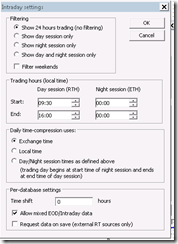
image

Then enter a new symbol EUR.USD-IDEALPRO-CASH and delete the symbol EURUSD if it exists.  If EURUSD exists, the data from MSN will go to that symbol and not where we want it to go.

Goto: Symbol->Information and enter the inputs below

Alias: EURUSD

image

You can also enter the ticksize and point value, this is helpful if you are using TipsterTrendlines.

Save you work: File->Save ALL

Turn off the data feed from IB TWS or close TWS (bottom right corner of Amibroker, right click, select Disconnect)

Open Amiquote Tools->Auto update quotes

Select the dates – try to load one year to start with.  If you select to much data it will not work.  You can do something like 2 years at a time to get a large database.

Select MSN Historical as the data source

Make sure Automatic Import is checked.

Start it by pressing the green triangle on the menu

After it finishes, click on EURUSD in Amiquote to make sure the data was downloaded, a text box will open showing a bunch or quotes.

Then go to Amibroker and select daily timeframe for EUR.USD-IDEALPRO-CASH and you should see a huge chart. 

Turn on the TWS data feed.

Then select the smallest timeframe and you will see data from IB, streaming.

You might notice that you can see daily data back more than 3 months but if you switch to hourly you wont have that much data.  The IB data feed length depends on the number of days to download and the period you selected for the IB database in the database setup.  This should be enough o get you started.

If you use Amibroker, I suggest you check out TipsterTrendines, the current users love it.  It sends your order instantly based on line you draw on the chart.  It’s a cheap solution compared to entering the wrong numbers in TWS.

Hope this help.  Spread the word in the forums.

Disclaimer

The information presented on this site is for educational and entertainment purposes only. This site contains no suggestions or instructions that you must follow, do your own research and due diligence before committing your cash to the markets. Your on your own.