Friday, February 17, 2012

Data from MT4 to Amibroker & Orders from Amibroker to MT4

After learning all about MT4 and MQL language, I thought “MT4 is MT Shit”, too many limitations and I know AFL way better than MQL.  Besides that the Amibroker back tester is far superior to the MT4 back tester.  I’ll do my system up in Ami and send the order to MT4. 
Here are the steps to do this:
  1. Load historical data into Ami (See this post Forex MSN Data)
  2. Get streaming data from MT4 to Amibroker
  3. Find or make AFL and MQL files to interact between the two platforms.  I found an MQL file (on a forum) that will read a text file.  Now I just need to make the trading system AFL write the text file.  I’ll make this code as an AFL include file.
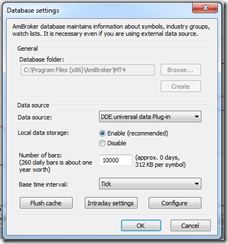
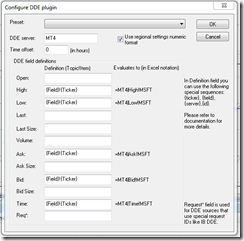
I just finished setting up the DDE feed from MT4 to Amibroker.  Here is how to set up the Amibroker DDE price feed.  One thing to watch out for is the fields, I got that part wrong initially.  See this screen shot and make sure it looks EXACTLY like this, notice the Ticker Price fields, which one comes first?  I wasn’t paying attention and spent a while figuring this out.
By the way, I’m using this on Windows 7 64 bit.
image
Notice the {Field}!{Ticker} – Field is first, when you open up this window for the first time, these fields are reversed.
image
Add the symbol to Amibroker, the same as it appears in MT4, some brokers add some stuff after the symbol, mine was only EURUSD for example.  So I added EURUSD to Amibroker.  Once you see the green box at the lower right side of Ami, add the symbol to the real time feed and watch the quotes come in. 
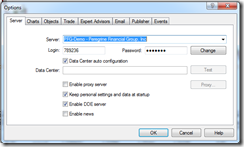
In MT4, you have to enable the “DDE Server”.  Go to “Tools->Options” and check the box.

To see errors, look at the MT4 "Journal" tab.  View->Terminal, then goto the new thingy that just opened and click the Journal tab.  You might see some errors that begin with "DDE......"

If you have any questions, use Google first, than ask me if your stuck.
image

image

Tuesday, February 14, 2012

Interactive Brokers, MSN, and Forex Data to Amibroker

This post may also be helpful – How to Get Forex Quotes from MSN into Amibroker

If you use IB, Amibroker, and TWS to trade Forex, chances are you have been confused with the data feed from IB.  Yu might have asked yourself “How do I get daily data from MSN and mix it with intraday data from IB on the same chart?”  I hope you didn’t answer yourself, at least out loud!!  You could enter EURUSD as a symbol in Amibroker and download daily data from MSN.  Then you could enter EUR.USD-IDEALPRO-CASH as a symbol so you can trade it from the Amibroker charts using Tipster Trendlines.  But the silver bullet would be to have both data sources on the same chart, and be able to use that chart to place and modify orders.

Why would anybody want to do this?  Because I trade Supply and Demand zones and I always look at the weekly and daily zones.  They tell me where I am in the universe.  Placing a trade with only 1 month of data is not a good idea, its a bad idea. 

This is how you do it.

Goto: File->Database Settings->Intraday Settings and make sure “Allow mixed EOD/Intraday data” is checked.  See below.

image

Then enter a new symbol EUR.USD-IDEALPRO-CASH and delete the symbol EURUSD if it exists.  If EURUSD exists, the data from MSN will go to that symbol and not where we want it to go.

Goto: Symbol->Information and enter the inputs below

Alias: EURUSD

image

You can also enter the ticksize and point value, this is helpful if you are using TipsterTrendlines.

Save you work: File->Save ALL

Turn off the data feed from IB TWS or close TWS (bottom right corner of Amibroker, right click, select Disconnect)

Open Amiquote Tools->Auto update quotes

Select the dates – try to load one year to start with.  If you select to much data it will not work.  You can do something like 2 years at a time to get a large database.

Select MSN Historical as the data source

Make sure Automatic Import is checked.

Start it by pressing the green triangle on the menu

After it finishes, click on EURUSD in Amiquote to make sure the data was downloaded, a text box will open showing a bunch or quotes.

Then go to Amibroker and select daily timeframe for EUR.USD-IDEALPRO-CASH and you should see a huge chart. 

Turn on the TWS data feed.

Then select the smallest timeframe and you will see data from IB, streaming.

You might notice that you can see daily data back more than 3 months but if you switch to hourly you wont have that much data.  The IB data feed length depends on the number of days to download and the period you selected for the IB database in the database setup.  This should be enough o get you started.

If you use Amibroker, I suggest you check out TipsterTrendines, the current users love it.  It sends your order instantly based on line you draw on the chart.  It’s a cheap solution compared to entering the wrong numbers in TWS.

Hope this help.  Spread the word in the forums.

Saturday, February 4, 2012

FM

Here’s a toy a recently purchased.  An FM transmitter.  Now I can listen to my tunes all over the house in great quality.

I use winamp with 2 plug-ins to make the transmission sound better than the local radio stations.

Here’s a pic of the back of the board after I had to do a mod to the board.

PCIMAX3000 Mod

Saturday, January 14, 2012

Canadian Forex Broker and MT4 – Questrade

Questrade offers MetaTrader 4 (MT4)
You heard it here first.
So after MF Global closed up shop I started looking for another broker.  I’ve already posted a little bit about this in the past month.  I want this broker to be covered under IIROC and CIPF.  MG Global was a member of CIPF and if they default on getting my money back to me, CIPF would have stepped in and refunded me 100%.  That wasn’t necessary, KPMG successfully got all the money back to me via a check mailed to me. 
I’ve tried FXCM and the Canadian broker they hooked up with called Friedburg Direct.  Well this set up is bullshit, you can’t open a MT4 account, you have to use FXCM-UK.  So after sending in the application and going through the process, the sale guy, YET AGIAN, was wrong wrong wrong wrong.  The lesson here is to call customer service of the parent company (usually US for the ones I was contacting), then new accounts, then customers service, get three different people to confirm the account set up.  Then call customer service in Canada and see if you get the same answer.  So I’ll probably open a small account to test new EA’s in a live platform.
I’ve been using Interactive Brokers and Questrade as well as TD Waterhouse (not to be confused with TD Ameritrade). 
Well TD sucks since the commissions are high, the platform is crap, and to get bracket order you have to pay to use the pro platform.  So those accounts are being moved now.
Interactive Brokers – great commissions, TWS platform is fine and very robust.They don’t allow RESP or RRSP but I do have an account with them.  To bad about the RRSP, had to find somewhere else for that, so I use Questrade.  BTW Trade Freedom was bought by some other company. 
So I’ve been with Questrade for a while now.  There basic platform is crappy too.  There is a new platform coming out shortly, I need to check to see if it will do OCA or bracket orders.  The big news here is they are covered under CIPF, regulated by IIROC, and they are BETA TESTING MT4.  Is that da bomb or what?
So I am about to start demo testing MT4 with Questrade.  I’ll keep you posted.

Disclaimer

The information presented on this site is for educational and entertainment purposes only. This site contains no suggestions or instructions that you must follow, do your own research and due diligence before committing your cash to the markets. Your on your own.